

July 27, 2026
How to Build a Multi-Agent Product Manager with Neuro San

How to Build a Multi-Agent Product Manager with Neuro San
A step-by-step tutorial for building a multi-agent product manager that monitors GitHub projects, communicates with developers, reviews pull requests, and helps coordinate agile software development using Neuro San.
Product managers play a central role in agile software development, coordinating work across engineering teams while monitoring project status, communicating priorities, and helping development move forward. Much of this work spans multiple systems and requires continuous awareness rather than a single interaction, making it a natural fit for a continuously running multi-agent system.
In this tutorial, we'll build a product manager to help our engineering teams with their agile software development process using Cognizant Neuro® San, our open-source framework for building multi-agent systems. Our product manager will monitor a Kanban board of development tickets, their respective priorities, and the different swim lanes. When needed, it will access the source code repository to look up different parts of the code and review pull requests. It will communicate proactively with the team through Slack, respond to developer inquiries, and send regular update emails to engineering leadership.
We'll implement the system as a continuously running multi-agent application that can be extended over time by adding new coded tools and agent subnetworks as the responsibilities of the product manager grow.
Giving the Product Manager the Right Tools
First, we need coded tools that give the system access to the applications and information required to perform its work.
We will write Python code to access source code and development tickets on GitHub through the GitHub API, read and write Slack messages through a Slack app, and send and receive email through a Gmail app and API. These coded tools are called by agents defined in Neuro San’s HOCON agent definitions.
For example, the following coded tool allows an agent to read a pull request and bounded changed-file patches from an explicitly allowlisted public GitHub repository:
{
    "name": "GitHubPullRequestRead",
    "class": "coded_tools.colleague.github_public_read.GitHubPullRequestRead",
    "function": {
        "description": "Read one pull request and bounded changed-file patches from an explicitly allowlisted public GitHub repository.",
        "parameters": {
            "type": "object",
            "properties": {
                "owner": {
                    "type": "string",
                    "maxLength": 100
                },
                "repo": {
                    "type": "string",
                    "maxLength": 100
                },
                "number": {
                    "type": "string",
                    "description": "Positive decimal pull request number"
                }
            },
            "required": [
                "owner",
                "repo",
                "number"
            ]
        }
    }
},
Wiring Together the Agent Network
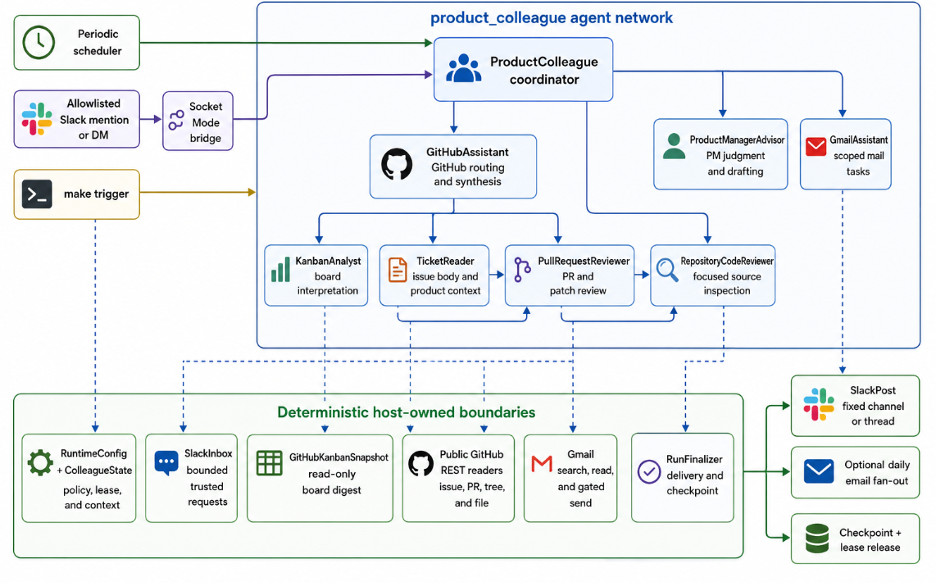
Next, we wire the agents together into a network. We break the product manager’s responsibilities down to their agentic, modular essence, with each agent receiving a bounded set of responsibilities within which it can act with some autonomy.
It makes sense to build the agent network step by step, testing and launching it before expanding it. This allows us to validate the behavior of the system before adding more responsibilities, tools, and agent subnetworks.
Neuro San’s Agent Network Designer can help generate the first draft of such a system automatically. We can simply describe the intended scope of the system, review the network it produces, and then edit and extend it much like vibing code.
Here is the agent network I landed on:
Running the Product Manager Continuously
The Neuro San server can serve agent networks by simply adding them to a manifest configuration file.
In this case, we want the product manager to run permanently, or at least wake up periodically to check the state of the Kanban tickets and the Slack channel. It can then determine whether there are any product management actions it needs to take.
Setting this up is straightforward in Neuro San, and the configuration format will be familiar to Linux users who have set up cron jobs. In the example below, our multi-agent product manager is called once an hour:
{
    "product_colleague.hocon": {
        "serve": true,
        "public": false,
        "mcp": false,
        "periodic": {
            "interactions": [
                {
                    # The runtime key is `enable` (not the `enabled` spelling
                    # shown in the prose of the original periodic-events PR).
                    "enable": true,
                    "cron_schedule": "*/15 * * * *",
                    "cron_schedule": ${?COLLEAGUE_CRON_SCHEDULE},
                    "second_at_beginning": false,
                    "text": """
Scheduled product-management heartbeat. Inspect the configured GitHub Project,
process any new allowlisted Slack requests, and report only material changes,
blockers, or a due daily digest. Do not emit a routine message every run.
""",
                    "metadata": {
                        "user_id": "system"
                    }
                }
            ]
        }
    }
}
The scheduled interaction instructs the system to inspect the configured GitHub Project, process any new allowlisted Slack requests, and report only material changes, blockers, or a daily digest when one is due. It also explicitly instructs the system not to emit a routine message on every run.
This allows the product manager to monitor the development process continuously without producing unnecessary updates when nothing important has changed.
Triggering the System from Events
A periodic schedule does not preclude the agent network from being invoked when an external event occurs, such as an inbound Slack message.
This mode of invocation is declared in the agent network definition HOCON file for the top-level agent. An application such as a Slack bridge can place events into an event queue for the agent network to process.
When an inbound Slack event is received, the event can trigger the agent network with a prompt instructing it to read the Slack inbox. The product manager can then review the message, determine what action is required, and respond through the appropriate tools.
Combining periodic execution with event-triggered invocation allows the product manager to operate in both modes. It can wake up regularly to inspect the broader state of the development process while also responding immediately when a developer sends a new request.
Building Extensible Multi-Agent Applications with Neuro San
This product manager is one example of how Neuro San can be used to build permanently running, event-triggered multi-agent applications. The system is not limited to a fixed set of responsibilities. As the role expands, we can add new coded tools, specialized agents, and agent subnetworks without rebuilding the application from the beginning.
The product manager can begin by monitoring tickets and Slack requests, then gradually take on additional responsibilities involving source-code lookup, pull-request review, team communication, leadership reporting, or other parts of the agile software development process.
A version of the product manager described in this post is already helping Neuro San’s own team develop Neuro San. Explore the implementation here.

Babak Hodjat is the Chief AI Officer at Cognizant and former co-founder & CEO of Sentient. He is responsible for the technology behind the world’s largest distributed AI system.