

June 16, 2026
Coded Tools in neuro-san: A Developer's Guide to Extending AI Agents With Python

Coded Tools in neuro-san: A Developer's Guide to Extending AI Agents With Python
Learn how coded tools in neuro-san give AI agents the ability to call APIs, run calculations, and handle sensitive data securely with Python.
Language models are powerful reasoners, but on their own they cannot take action in the world. They cannot call your internal API, query a live database, generate an image, or do arithmetic without occasionally getting it wrong. To do those things, agents need tools: external functions they can invoke when the task requires something beyond what the model can generate from memory.
Tool calling is now a standard part of how agentic AI systems work. The model is given a set of tools, each described by a name, a natural language description, and a parameter schema. When the model determines that a tool is relevant, it generates a structured call with the appropriate arguments. The system executes the function and returns the result to the agent, which continues reasoning from there. This is what turns a language model from a text generator into a system that can actually do things.
In neuro-san, coded tools are the framework's implementation of this concept. They are custom Python functions, written as classes, that you attach to agents in your network. When an agent needs to fetch live data, run a precise calculation, interact with an external service, or handle a credential securely, it invokes a coded tool. The model decides when and how to call it. Python handles the execution. This post covers how coded tools work in neuro-san, walks through real examples, and shows you how to build and install one.
What Exactly is a Coded Tool?
A coded tool in neuro-san is a custom tool built as a Python class and wired into an agent network through HOCON configuration. Like tool calling in any agentic framework, the model receives a description of what the tool does and what parameters it takes. When the agent decides the tool is relevant, it generates the arguments, neuro-san executes the Python class, and the result is returned to the agent to continue the workflow.
What makes coded tools powerful is that they are not limited to any fixed set of capabilities. If Python can do it, a coded tool can do it. You can write a coded tool that queries a database, calls the Google Maps API, generates an image, performs a financial calculation, or reads from a message queue. The agent network gains whatever capability the tool exposes, invoked automatically when the model determines it is needed.
neuro-san also supports LangChain's BaseTool interface, so existing LangChain tools can be registered in a neuro-san network directly without reimplementing them, and agents can call tools exposed by remote MCP servers. You can scope tools at different levels: define a coded tool inside a specific agent's HOCON configuration to limit it to that agent, or register it in a shared toolbox config file to make it available across multiple agent networks.
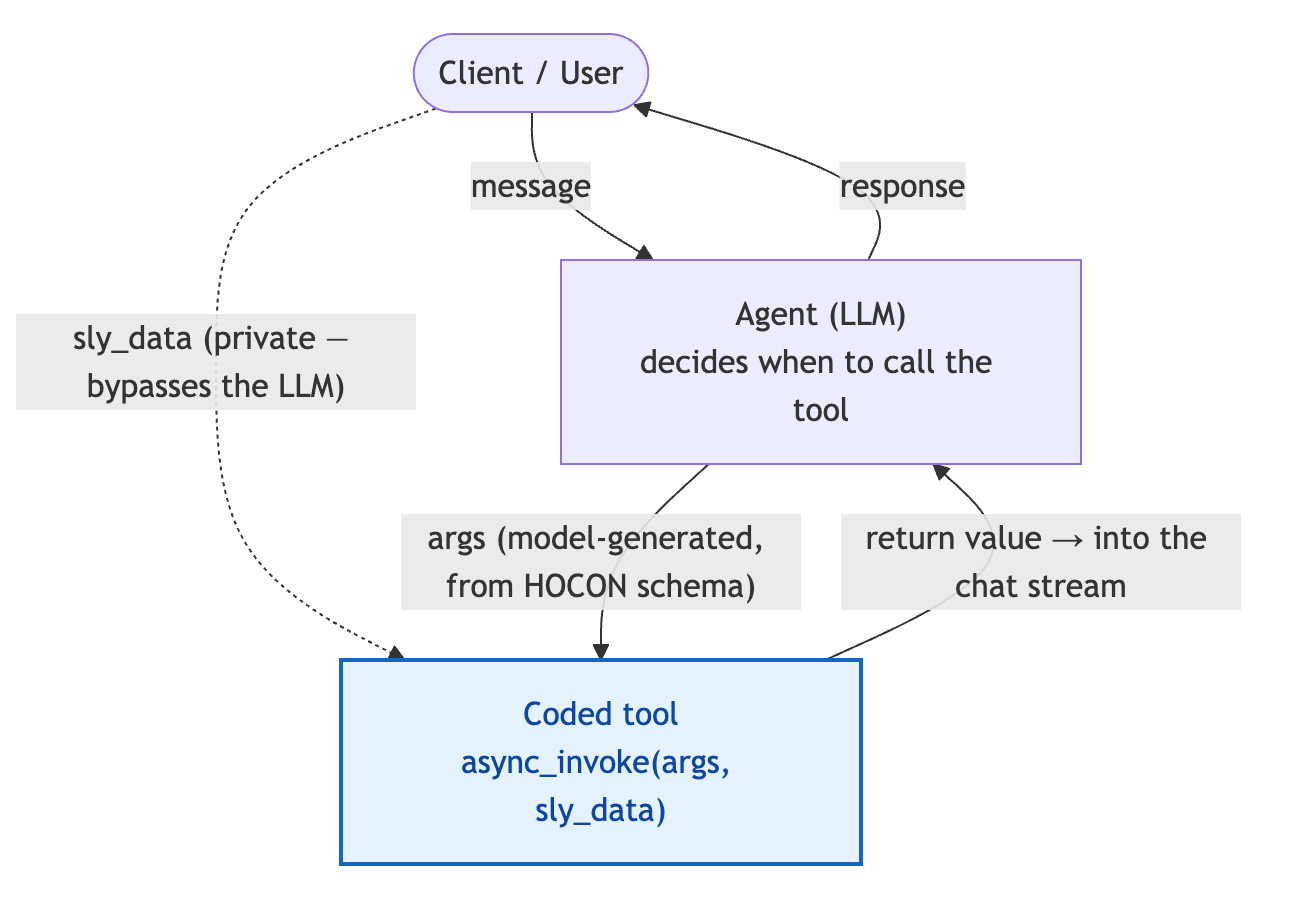
How Coded Tools Work: async_invoke, args, and sly_data
Every coded tool in neuro-san is a Python class that subclasses CodedTool and implements a single async method: async_invoke(). This is the method the framework calls when an agent invokes the tool. It receives two dictionaries as input.
The first is args. This is populated by the LLM at call time, based on the parameter schema you define in the tool's HOCON configuration. The model reads the schema, determines what values are appropriate for the current task, and passes them in. You define the shape of the inputs. The model figures out what to put in them. Treat args as read-only — it is the model's input to your tool.
The second is sly_data. This is a protected channel that bypasses the language model entirely. Data in sly_data travels directly from the user or system layer to the tool, which makes it the right place for anything sensitive: API keys, session tokens, access credentials, PII. Keeping this data out of the model's context is not just good practice; it is the mechanism that makes coded tools safe to use in production environments where real credentials are involved.
sly_data has a second use worth knowing about. Coded tools within the same session can use it as a shared bulletin board, letting multiple tools cooperate on results without routing information back through the LLM. If one tool fetches a record that a downstream tool needs, sly_data is how they pass that state between them. By convention sly_data is treated as largely read-only: a tool may add a new key as a bulletin-board entry, but only when ownership of who writes what is well understood and the writing tool is invoked exactly once.
The async interface is required because neuro-san runs as an asynchronous server. Multiple agents can invoke their tools concurrently, and the async design prevents one tool's network I/O from blocking another. There is also a synchronous invoke() method available as a convenience for getting started, but its use is discouraged: a blocking call inside it stalls the entire event loop and every other in-flight agent request. Prefer async_invoke(). If you genuinely cannot avoid blocking, wrap it: return await asyncio.to_thread(self.invoke, args, sly_data).
Coded Tools in Code: The Accountant Example
The Accountant tool from the music_nerd_pro sample network is a clean illustration of the pattern. MusicNerdPro is a single conversational agent that answers music questions — but it charges a running fee per question. Asking the LLM to keep an accurate, ever-increasing tally across a conversation is exactly the kind of bookkeeping models are unreliable at. The Accountant coded tool handles it deterministically: it takes the current running cost, adds the per-question fee in Python, and returns the updated total. It also demonstrates sly_data as a bulletin board — when the cost is tracked privately rather than through the model, the tool persists the new total back into sly_data for the next call.
Python — coded_tools/basic/accountant.py
from typing import Any, Dict, Union
from neuro_san.interfaces.coded_tool import CodedTool


class Accountant(CodedTool):
    """A tool that updates a running cost each time it is called."""

    async def async_invoke(
        self, args: Dict[str, Any], sly_data: Dict[str, Any]
    ) -> Union[Dict[str, Any], str]:
        # Get running_cost from args first, then sly_data, then default to 0.0
        if "running_cost" in args:
            running_cost: float = float(args.get("running_cost"))
        else:
            running_cost: float = float(sly_data.get("running_cost", 0.0))

        updated_running_cost: float = running_cost + 3.0

        # If the cost came in privately via sly_data, write the new total
        # back to sly_data so the next call continues from it.
        if "running_cost" not in args:
            sly_data["running_cost"] = updated_running_cost

        return {"running_cost": updated_running_cost}
The HOCON entry is what registers the tool in the agent network and makes it visible to the model. It defines the tool's name, a natural language description the LLM reads to understand when the tool is appropriate, the parameter schema the model uses to populate args, and a class field pointing to the Python implementation.
The description field matters more than it might appear to. In tool calling, the model relies almost entirely on the description to decide when to invoke a tool and what arguments to generate. A vague description causes the tool to be skipped or called incorrectly. Write it the way you would write a docstring intended for another developer: precise, specific about when to use it, and clear about what the parameters expect.
HOCON – the tool definition plus the agent that calls it
{
    "tools": [
        {
            # The "front man" — the LLM agent that talks to the client.
            # A front man cannot itself be a coded tool.
            "name": "MusicNerdPro",
            "function": { "description": "I can help with music-related inquiries." },
            "instructions": "You are Music Nerd Pro. This service comes for a fee.
For each question you receive, call your Accountant tool to compute the running cost,
            then answer with a JSON object containing answer and running_cost keys.",
            "tools": ["Accountant"],
            "structure_formats": "json"
        },
        {
            "name": "Accountant",
            "function": {
                "description": "Keeps a running cost of the service. Pass the current running cost to get the updated total. If none is known, pass 0.00.",
                "parameters": {
                    "type": "object",
                    "properties": {
                        "running_cost": {
                            "type": "float",
                            "description": "The current running total of the service cost."
                        }
                    },
                    "required": ["running_cost"]
                }
            },
            "class": "accountant.Accountant"
        }
    ]
}
With both pieces in place, the tool is live in the network. When MusicNerdPro determines it needs to update the fee, neuro-san routes the call, passes the model-generated args and any sly_data into async_invoke(), and returns the result to the agent to continue its work.
Examples of Coded Tools in neuro-san
The Accountant tool illustrates the mechanics, but the real value of coded tools comes through when you see them connecting agent networks to systems they could not otherwise reach. The neuro-san-studio repository ships dozens of prebuilt coded tools that wire agent networks into external APIs, databases, media generation services, and search infrastructure.
Web and knowledge search: A whole family of search tools (e.g. Brave, Google Serper, DuckDuckGo, and OpenAI web search) give agents live access to the web. Because each exposes the same kind of capability behind a different backend, they are a good demonstration of how a tool abstracts the provider away from the agent: the agent expresses what it needs, and the tool handles the specific API.
Retrieval-augmented generation (RAG): Retriever tools pull grounded context from PDFs, arXiv, Confluence, Wikipedia, and live web pages. The agent asks a question; the tool fetches and returns relevant passages without the connection details or document store ever entering the model's context.
Image and video generation: Tools for OpenAI and Gemini image generation, plus video generation, integrate media creation directly into a running network. When a task requires an image, an agent invokes the tool, the API call executes in Python, and the output flows downstream automatically. The generation step becomes a native part of the workflow, with no manual handoff between systems.
Enterprise and API integrations: The intranet_agents_with_tools network mimics a corporation's intranet, where an HR agent calls a coded tool that hits live HCM APIs. Other patterns include database query tools that retrieve records without exposing connection strings, and authentication tools that route credentials through sly_data so sensitive values never enter the inference layer.
The same principle applies across all of them: the model coordinates the workflow and decides when to invoke a tool, Python executes the task, and the network does work that neither the model nor a static pipeline could do alone.
How to Build a Coded Tool in neuro-san
Building a coded tool is a three-step loop: write the Python class, register it in HOCON, and point the framework at the file. Python owns what the tool does; HOCON owns when the model calls it. Once you understand what each is responsible for, the implementation is straightforward.
Step 1: Write the Python class
Create a class that subclasses CodedTool and implements async_invoke(). The class must have a no-argument constructor, and it should return a JSON-serializable value – a string or a dict – since the return value flows back into the chat stream.
from typing import Any, Dict, Union
from neuro_san.interfaces.coded_tool import CodedTool


class Accountant(CodedTool):
    """A tool that updates a running cost each time it is called."""

    async def async_invoke(
        self, args: Dict[str, Any], sly_data: Dict[str, Any]
    ) -> Union[Dict[str, Any], str]:
        # args is populated by the LLM from the HOCON parameter schema.
        # sly_data is the private channel — never seen by the model.
        running_cost = float(args.get("running_cost", 0.0))
        return {"running_cost": running_cost + 3.0}
Two rules to keep in mind:
Treat args as read-only. It is the model's input to your tool.
Prefer async_invoke() over the synchronous invoke(). A blocking call inside a synchronous tool stalls the whole event loop and every other in-flight agent request. If you cannot avoid blocking, offload it with return await asyncio.to_thread(self.invoke, args, sly_data).
Step 2: Register the tool in HOCON
Add a tool entry to your agent network so the model can see it. The description is what the LLM reads to decide whether and how to call the tool – write it like a docstring for the model. parameters defines the shape of args. class points at the implementation as module.ClassName.
{
    "name": "Accountant",
    "function": {
        "description": "Keeps a running cost of the service. Pass the current running cost to get the updated total. If none is known, pass 0.00.",
        "parameters": {
            "type": "object",
            "properties": {
                "running_cost": {
                    "type": "float",
                    "description": "The current running total of the service cost."
                }
            },
            "required": ["running_cost"]
        }
    },
    "class": "accountant.Accountant"
}
Then list the tool on the agent that should be able to call it:
{
    "name": "MusicNerdPro",
    "function": { "description": "I can help with music-related inquiries." },
    "instructions": "...For each question, call your Accountant tool to compute the running cost...",
    "tools": ["Accountant"]
}
Note on the front man: the first agent in a network (the one that talks to the client) cannot itself be a class-based coded tool. It must be an LLM agent that delegates to coded tools.
Step 3: Make the class resolvable on the path
neuro-san resolves the class value (accountant.Accountant) by looking under the directory named by the AGENT_TOOL_PATH environment variable, which defaults to <project-root>/coded_tools/. Resolution is two-tier:
Agent-specific: coded_tools/<agent_network_name>/<module>.py
Shared fallback: coded_tools/<module>.py (one level up), available to any network.
So for the music_nerd_pro network, accountant.Accountant lives at coded_tools/basic/accountant.py. Alternatively, you can skip the shortcut and give class a fully-qualified import path, as long as it is on the server's PYTHONPATH.
Restart the server and the tool is live. When the agent decides it is needed, neuro-san passes the model-generated args and the session's sly_data into async_invoke() and routes the return value back into the conversation.
Installing and Running
Coded tools live inside an agent-network project. The fastest path to a runnable one is through neuro-san-studio:
pip install neuro-san-studio   # OpenAI, Anthropic, and Gemini provider libs included
ns init                        # scaffold config/, registries/, and coded_tools/
export OPENAI_API_KEY=...       # or create a .env file
ns run                          # server on :8080, nsflow UI on http://localhost:4173
To add your own tool: drop the .py file under coded_tools/<network>/, add the HOCON entry, register the network in registries/manifest.hocon, and run ns run again. To study a complete working example end to end, pull in the sample networks with ns import basic and open coded_tools/basic/accountant.py alongside registries/basic/music_nerd_pro.hocon.
Securing Data with sly_data
The sly_data channel is neuro-san's answer to a hard problem: agents often need to act on sensitive data like credentials, tokens, and PII that should never enter a model's context. Because sly_data bypasses the LLM entirely, your tools can use those values while the model never sees them.
sly_data is also governed by a security-by-default policy: nothing crosses a network boundary unless you explicitly allow it. There are three boundaries: data going out to external networks (to_downstream), data coming back in (from_downstream), and data returned to the client (to_upstream):
"allow": {
    "to_upstream":     { "sly_data": ["equals"] },    // what the client may receive back
    "to_downstream":   { "sly_data": ["x", "y"] },    // what external networks may receive
    "from_downstream": { "sly_data": ["equals"] }     // what may be ingested from them
}
You can also selectively block or rename keys as they cross a boundary. For example, "user_ssn": false to keep a value internal, or "my_session": "session_id" to translate a key name on the way out. By default, nothing is shared, so you state explicitly what is allowed through.
Scoping Tools: Per-Network vs. The Toolbox
A coded tool can be wired in at two levels, and choosing between them is a real design decision:
Per-network (the class form shown above): Define the tool inside a specific agent network's HOCON. Use this when the tool is specific to that network.
Shared via the toolbox: Register the tool once in a toolbox configuration file and reference it from any network with "toolbox": "tool_name". Use this when the same capability is useful across many networks. neuro-san ships a default toolbox (for example, the get_current_date_time coded tool and the requests_* LangChain HTTP tools); you can extend it with your own by setting the toolbox_info_file key in a network's HOCON or the AGENT_TOOLBOX_INFO_FILE environment variable.
A toolbox agent executes code directly rather than calling an LLM, so it cannot also have a tools field – meaning it cannot invoke other agents as downstream tools.
Debugging a Coded Tool
Because a coded tool is just Python, you debug it the way you debug any Python. The simplest approach is to log at the top of async_invoke() (every prebuilt tool in the repo does this) and watch the entries appear in logs/server.log as the agent fires the tool:
from logging import getLogger

async def async_invoke(self, args, sly_data):
    logger = getLogger(self.__class__.__name__)
    logger.debug("args: %s", args)
    ...
You can also set a breakpoint on the first line of invoke/async_invoke and step through with your debugger of choice while the server runs.
Get Started in neuro-san
Coded tools are what bridge the gap between an agent network that reasons well and one that can operate on real systems and real data. They bring the same tool-calling capabilities that make modern agentic AI useful into neuro-san's multi-agent architecture, with the added benefits of secure credential handling through sly_data and deep integration with the HOCON-based network configuration.
The neuro-san-studio GitHub repo includes working coded tool examples across a range of use cases, from simple utilities to full integrations with external APIs. If you are building a neuro-san agent network and want to see how coded tools fit into a complete system, it is the best place to start.

Noravee specializes in machine learning, NLP, and analytical modeling, with a background in condensed matter physics