

August 31, 2026
Start Building Agent Networks in Minutes: Cognizant Neuro® San Is Now Hosted With BYOK

Start Building Agent Networks in Minutes: Cognizant Neuro® San Is Now Hosted With BYOK
Cognizant AI Lab has launched a hosted, bring-your-own-key (BYOK) version of Neuro San, giving developers and non-technical users a low-friction, no-code way to build and experiment with multi-agent networks directly in their browser.
Until now, getting started with Cognizant Neuro® San meant setting it up and running it in your own development environment. That gives developers the flexibility to build deeply with Neuro San, but not every project needs to start there. Sometimes you want a faster way to build an agent network, develop it into a working prototype and see what it can do before deciding how much further you want to take it. We wanted to make that path much easier.
So we’ve created a faster way to get started. Neuro San, Cognizant AI Lab’s open-source framework for building and orchestrating networks of specialized AI agents, now has a hosted, bring-your-own-key (BYOK) version. Instead of setting up and running Neuro San Studio locally before you can try it, you can open it in your browser, enter your Open AI or Anthropic API key, and start building.
We’ve made building the network itself just as approachable. The hosted experience includes Neuro San’s Agent Network Designer, which lets you describe what you want your agent network to do in plain language descriptions. The Designer turns that intent into a network of specialized agents, defining their roles and how they work together, so you can start experimenting without having to code the network yourself.
Together, the hosted experience and Agent Network Designer make Neuro San a low-friction, no-code quick start for building multi-agent systems. You can go from an idea to a working agent network in minutes. And when you’re ready to go further, the full open-source Neuro San framework gives you access to more advanced tools to ground your agent networks – using MCP connectors, API calls, and middleware tools.
Build a Multi-Agent System from a Plain-Language Prompt
The Agent Network Designer starts with what you want your agent network to do, rather than how to implement it. You might want a network that researches a market, divides the work among specialists and brings their findings together. You might want agents that analyze a business problem from different perspectives before another agent synthesizes a recommendation. Or you might understand a process well but have no idea how to translate it into a multi-agent architecture.
With the Agent Network Designer, you can describe that intent in natural language. Neuro San uses it to create an initial network of agents and define how they collaborate. From there, you can test the network and continue changing it through the same natural-language workflow.
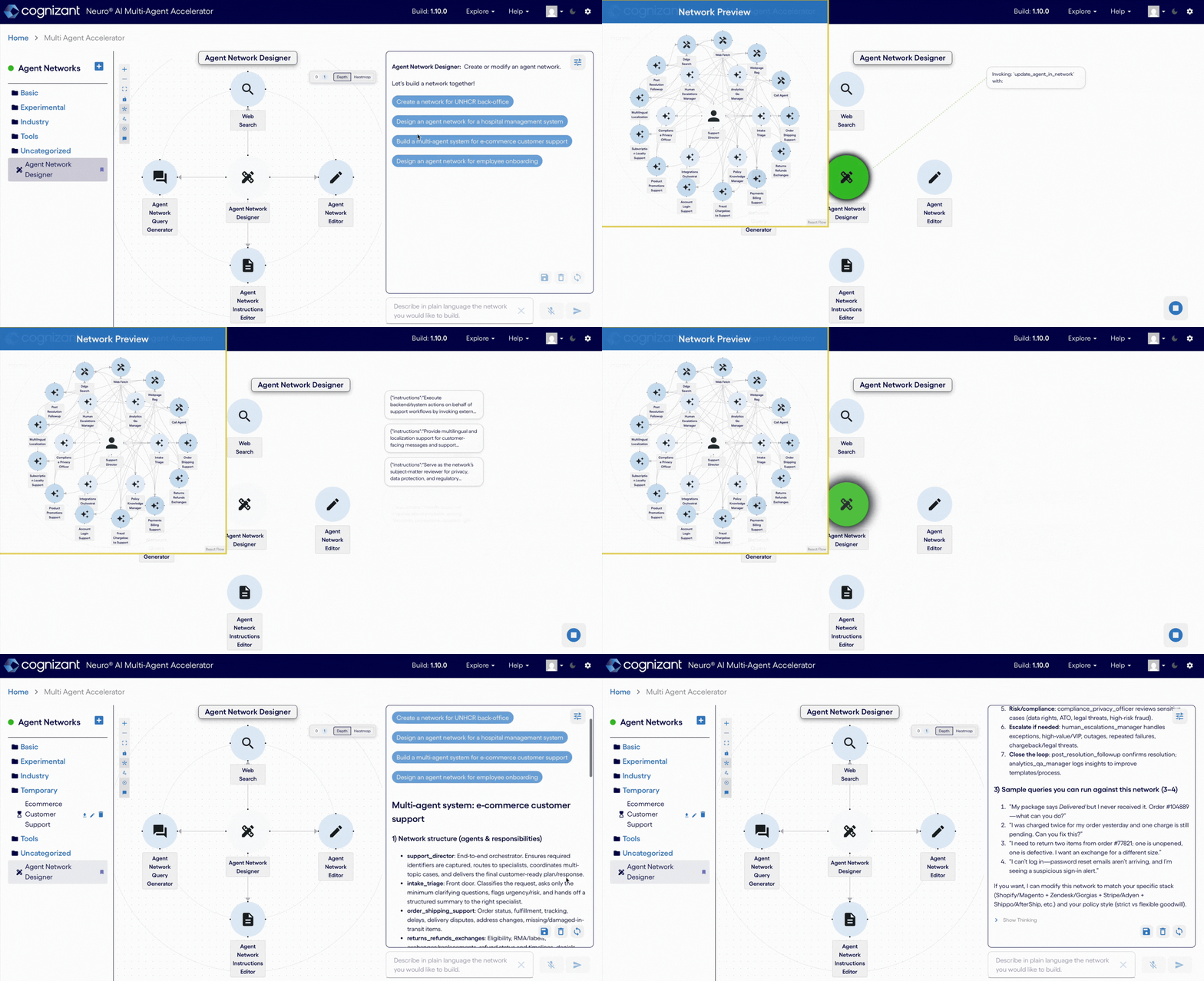
That makes development much more iterative. You might realize that one agent is doing too much and ask the Designer to divide its responsibilities. You might add a specialist, change the role of another agent, or reorganize how information moves through the network. Instead of manually redesigning the architecture every time your idea changes, you can keep describing what you want and refining what Neuro San builds.
Anything you build this way is yours to take with you. Once a network is working the way you want, you can download it (as a HOCON configuration file) and run it with Neuro San in your own environment, so what you create in the browser isn't confined to the browser.
For someone exploring multi-agent systems for the first time, that means you can begin with an idea instead of a codebase.
A BYOK Quick Start for Developers, Teams and Business Users
Making it easier to build an initial network changes who can participate in the process and how quickly an idea can become something tangible.
Developers and ML engineers can prototype an agent network in minutes, test how it works and then import it into their own environment for deeper development. Teams evaluating multi-agent approaches can quickly turn a concept into a working prototype they can put in front of stakeholders, rather than trying to explain the idea in a deck. And business users and domain experts can bring their knowledge of a process directly into the building process, using plain language to create and refine a working agent network without needing to write code.
That last group is particularly interesting. The people who understand a process best are not always the people who know how to implement an agent architecture. A no-code designer gives those domain experts a way to participate directly in building and testing what the agent network should look like.
Move from the Hosted Neuro San Quick Start to the Full Open-Source Framework
The hosted BYOK version is designed to be the quickest way to start building with Neuro San, but it’s only one way to use it. When an experiment becomes something developers want to take further, the open-source Neuro San repository provides a broader framework for building in their own environment.
You can use the full framework to connect agent networks to additional tools and data sources, add grounding, work with MCP connectors, customize how networks operate, and integrate Neuro San into larger applications, workflows and hyperscalers. The framework also supports testing agent networks, deploying them to production, and scaling with demand. That creates a natural path from quickly exploring an idea in the hosted experience to deeper development as a use case evolves.
The technology behind the hosted experience is open source as well. The neuro-san-ui repository includes the code behind the Neuro San web experience along with ui-common, a shared component library for developers building applications that interact with Neuro San services. Developers can use those components in their own projects, contribute improvements, report issues and help shape how people build and interact with Neuro San.
Together, these pieces provide different entry points into the same open-source ecosystem. Someone new to multi-agent systems can begin in the browser without writing code. A developer can rapidly prototype a network before moving into their own development environment. And teams that want to build their own experiences around Neuro San can work directly with the framework and its open-source UI components.
The goal isn’t to make every Neuro San use case fit inside the hosted experience. It’s to make the hosted experience an easy place to start, with the open-source ecosystem there when you’re ready to keep building.
Why Bring Your Own API Key?
The hosted version uses a BYOK model, which means you connect a supported OpenAI or Anthropic API key from your own account to power the agents in your network. In the hosted experience, the models themselves are determined by what is currently configured on the Neuro San server. If you run Neuro San locally, you have more flexibility to configure the API keys, providers and models you want to use.
It also means there's no deployment step standing between you and a working network, which matters more than it sounds like it should. Many decisions about a multi-agent system only become clear once something is running in front of you. How many agents should there be? What should each one own? Where should responsibilities divide, and how should the agents pass work between them? Those questions are hard to answer in the abstract and much easier to answer against a network you can interact with and change.
1,650+ Cognizant Associates Already Used the Hosted Neuro San Experience
We have already seen this at scale internally. More than 1,650 Cognizant associates registered for the Neuro San Multi-Agent Accelerator Hackathon earlier this summer, and many of them built their own agent networks over the course of a single week using the same hosted experience and Agent Network Designer workflow that is now available more broadly.
Participants used Neuro San to move from an idea to a functioning multi-agent network within the span of the hackathon, giving us a chance to see what happens when people with very different levels of technical experience are given a faster way to experiment with agentic systems. The winning projects showed just how varied those applications could be: one team developed a client-specific standards concierge to help developers quickly identify the right engineering guidance for an engagement, while another built release-readiness and code-review agents that brought security, testing and quality validation into software delivery workflows. A third created an AI COO that coordinated specialist agents to analyze business performance, diagnose issues and recommend actions.
Opening that same hosted experience to people outside Cognizant was the obvious next step.
Start Building a Multi-Agent Network with Neuro San
If you have an idea for an agent network, you can now go to neuro-san.evolution.ml, bring your API key and describe what you want to build. The Agent Network Designer can turn that description into an initial network that you can interact with and continue refining in your browser.
If that prototype becomes something you want to develop further, head to the open-source Neuro San repository to work with the broader framework, connect additional tools and data, and customize Neuro San for your own environment.
Get building, and we’re excited to see what you all create!

Software engineer expert specializing in Big Data, particularly the Java platform with tools such as Hadoop, HBase and Kafka.