

July 9, 2026
Agent Skills in Neuro San: Portable Expertise, Loaded Only When Needed

Agent Skills in Neuro San: Portable Expertise, Loaded Only When Needed
How Neuro San uses a progressive disclosure pattern to give any agent reusable, self-contained capabilities without bloating the system prompt or touching your agent graph.
Building a multi-agent system that scales in production means solving a problem that does not show up in early prototypes: how do you give agents reusable, maintainable expertise without embedding everything they need to know directly into their instructions? Pasting domain knowledge, workflow logic, and format guidelines into agent prompts works until it does not. Prompts grow unwieldy, the same content gets duplicated across every network that needs it, and updating a single piece of knowledge means tracking down every agent that references it.
In our previous post, we introduced middleware support in Neuro San, a mechanism for attaching Python classes that wrap the agent reasoning loop at defined lifecycle points. Agent Skills are built entirely on top of that primitive. We are excited to share that Neuro San agents can now use Agent Skills: self-contained packages of instructions, scripts, and resources that give any agent specialized capabilities and domain expertise, loaded progressively so agents only pull what they need, when they actually need it. You point an agent at a skill directory, local or remote, and it gains a new capability without you touching its instructions or its tool graph.
This post covers what Agent Skills are, how progressive disclosure keeps token costs low, and how to attach them to any agent in your network.
What Are Agent Skills?
Agent Skills are portable packages of instructions, scripts, and resources that give agents specialized capabilities and domain expertise. They follow the open Agent Skills specification and implement a progressive disclosure pattern so agents load only the context they need, when they need it.
A skill is a reusable unit of know-how. Rather than pasting workflow logic and domain-specific guidance directly into an agent's instructions, you package it into a self-contained directory that any agent in any network can reference. The agent sees only a one-line description at startup and pulls the full instructions on demand when the task calls for it. This keeps prompts lean, makes expertise easy to maintain and share across networks, and means updating a skill propagates everywhere it is used without touching a single agent definition.
Each skill follows a simple directory structure:
my-skill/
├── SKILL.md          # YAML frontmatter (name + description) + instructions
├── references/       # optional supporting docs
├── scripts/          # optional helper scripts
└── assets/           # optional templates, examples, etc.
The SKILL.md file is the entry point. It starts with a small YAML frontmatter block that gives the skill a name and a one-line description, followed by the full instructions the agent will use when the skill is relevant:
---
name: name-analytics
description: Analyze and determine career information based on a person's given name
---

# Name Analytics Skill
## When to Use
...
## Instructions
...
That frontmatter is intentionally minimal. The name and description are all Neuro San needs at startup. The rest of the file, and any supporting files in the directory, are loaded only when the agent decides the skill is relevant. Skills can live on your local filesystem or be fetched from a URL, for example, straight from a public skills repository.
Why Progressive Disclosure Matters
The straightforward approach to giving an agent a skill is to paste the entire SKILL.md into the system prompt. That works for one small skill and falls apart quickly once you have ten of them, or even one large one. You pay for every token on every turn, regardless of whether the skill is relevant to the current request.
The Agent Skills specification defines a three-stage progressive disclosure pattern that Neuro San implements exactly:
At startup, the middleware scans every skill source and loads only the metadata: the name, description, and location. That is all that enters the system prompt.
On demand, when the agent decides a skill matches the user's request, it calls a tool to pull the full SKILL.md content.
Selectively, if those instructions reference additional files in references/, scripts/, or assets/, the agent loads those only when it actually needs them.
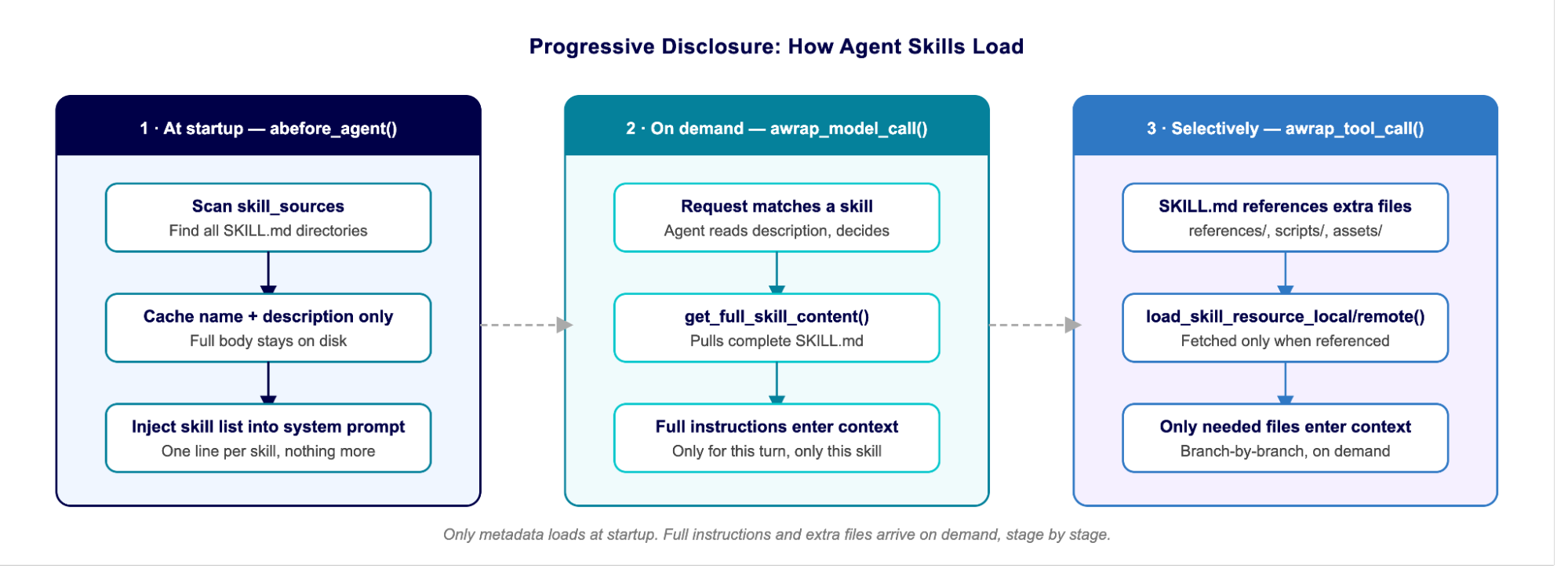
A network with a dozen skills pays only a dozen one-line descriptions upfront. The full weight of a skill enters context only when it is genuinely in use.
How It Works: Agent Skills Are Middleware
AgentSkillsMiddleware is a standard class-based AgentMiddleware, wired up in HOCON exactly like any other middleware in Neuro San. It uses four lifecycle hooks:
Hook | What it does |
abefore_agent() | Opens an HTTP session and scans skill sources, caching each SKILL.md metadata |
awrap_model_call() | Injects the Available Skills list and usage instructions into the system prompt |
awrap_tool_call() | Optionally intercepts skill tool calls to keep large skill bodies out of persisted history |
aafter_agent() | Closes the HTTP session |
Alongside these hooks, the middleware registers three tools that the agent can call to progressively load skill content:
get_full_skill_content(skill_name=...) loads the complete SKILL.md for a given skill.
load_skill_resource_local(resource_path=...) reads an additional file from the skill's local directory.
load_skill_resource_remote(resource_url=...) fetches an additional file from the skill's remote URL root.
Each tool maps directly to a method on the middleware. The metadata lives in the system prompt, and the tools handle everything that comes after. That is the whole machine.
Tutorial 1: Attach a Local Skill
Here is an agent that can guess someone's career from their first name. The skill lives at skills/tests/job_guessing/ and contains:
skills/tests/job_guessing/
├── SKILL.md          # name → career mapping + "when to use"
├── SALARY.md         # name → salary mapping
└── location/
    └── LOCATION.md   # name → location mapping
The SKILL.md instructions reference SALARY.md and LOCATION.md, but tell the agent to load them only if the user asks about salary or location. The agent does not pay for those files unless the conversation actually needs them.
Attach the middleware to any agent in HOCON:
{
    "name": "name_assistant",
    "function": { "description": "I can help with name-related inquiries." },
    "instructions": "You are a name assistant that provides career information based on the user's name.",

    "middleware": [
        {
            "class": "middleware.agent_skills_middleware.AgentSkillsMiddleware",
            "args": {
                # Each entry must be a directory containing a SKILL.md.
                # Local path (relative to the run dir) or absolute path.
                "skill_sources": ["skills/tests/job_guessing"],

                # Keep loaded skill bodies in chat history? (see below)
                "keep_skill_in_context": true
            }
        }
    ]
}
The agent's instructions say nothing about careers, salaries, or locations. All of that arrives through the skill. Here is what the conversation looks like:
What the conversation looks like
Human: What does Bob do for a living?

AI:
  [calls get_full_skill_content(skill_name="name-analytics")]

  Bob is a physicist.


Human: Where does he work, and what's his salary?

AI:
  [calls load_skill_resource_local(resource_path="location/LOCATION.md")]
  [calls load_skill_resource_local(resource_path="SALARY.md")]

  Bob works in San Francisco and earns $300,000 per year.
Notice the staging. The first turn pulls only SKILL.md. The location and salary files are fetched only on the second turn, because that is when the instructions said to load them.
Full example: registries/basic/job_guessing_skill.hocon in neuro-san-demos.
Tutorial 2: Attach a Remote Skill
Skill sources can also be URLs. Here is the same middleware configuration pointed at a public skill served over HTTP:
"middleware": [
    {
        "class": "middleware.agent_skills_middleware.AgentSkillsMiddleware",
        "args": {
            "skill_sources": [
                "https://raw.githubusercontent.com/anthropics/skills/main/skills/internal-comms/"
            ],
            "keep_skill_in_context": true
        }
    }
]
The middleware fetches SKILL.md from <source>/SKILL.md, and when the skill's instructions reference additional files, the agent calls load_skill_resource_remote to pull them from the same base URL. Local and remote skills behave identically from the agent's point of view. Only the loader tool differs.
You can mix local and remote sources in one list. If two skills share the same name, the later source wins.
Full example: registries/basic/internal_communication_skill.hocon in neuro-san-demos.
The keep_skill_in_context Knob
This single flag controls the token and recall trade-off, and it is worth understanding because it leans on the awrap_tool_call hook described in the previous post.
In Neuro San, tool results are normally written into the agent's journal and replayed as part of the persisted chat history on every subsequent turn. For a large SKILL.md, that means paying for the whole skill body on every turn after it is loaded.
keep_skill_in_context: true keeps skill content in chat history. The agent can cross-reference multiple skills at once. Higher token cost, fewer reloads. Best when a task needs several skills synthesized together.
keep_skill_in_context: false (recommended default) has the middleware intercept the skill tool call in awrap_tool_call, call the underlying method directly, and return the content as a ToolMessage for that turn without routing it through the journaling handler. The model sees the content when it needs it, but it is not permanently baked into history. This produces significant savings on long conversations, and the agent simply reloads a skill in the rare case it needs it again.
For most use cases, false is the right default. Use true only when an agent needs to hold multiple skills in mind simultaneously.
How the Agent Knows What Is Available
On each model call, awrap_model_call appends an Available Skills section to the system prompt, built entirely from the cached metadata and never from the full skill bodies:
## Available Skills

**name-analytics**
  - Description: Analyze and determine career information based on a person's given name
  - Location: `skills/tests/job_guessing/SKILL.md`

## How to Use Skills (Progressive Disclosure)
1. Identify the relevant skill from the descriptions above
2. Load full instructions with get_full_skill_content(skill_name='...')
3. Follow the workflow in SKILL.md
4. Load additional resources only if SKILL.md references them
The descriptions are doing real work here. They are the only signal the model has for deciding when to reach for a skill. Write them the way you would write a good tool description: specific about when the skill applies, not just what it contains.
Spec Compliance and Validation
The middleware validates skills against the Agent Skills spec as it loads them, and skips anything malformed with a warning rather than failing the entire network. The key validation rules are:
Frontmatter required. SKILL.md must start with a valid YAML frontmatter block.
name must be 1 to 64 characters, lowercase letters, digits, and hyphens only, with no leading, trailing, or consecutive hyphens.
description is required and truncated at 1024 characters.
allowed-tools is optional and accepts either a YAML list or a space-delimited string.
If a source is missing its SKILL.md, has invalid YAML, or violates the naming rules, it is logged and ignored. Your other skills still load.
A Note on Security: Treat Remote Skills Like Untrusted Code
A skill is instructions for your agent. Loading one from the internet is closer to running someone else's code than to reading a document. The middleware includes guardrails, but you own the trust decision.
Built-in mitigations include source allow-listing, where both resource loaders call _validate_resource_path(...) and refuse any path or URL that does not resolve under a configured skill_sources entry. Local paths are resolved first so directory traversal cannot escape the skill directory, and remote fetches cannot be redirected to arbitrary hosts. HTTP timeouts are also enforced on every remote fetch so a slow or hostile server cannot hang the agent.
Your responsibilities are to review SKILL.md and anything in scripts/ before use, prefer local vetted skills in production, and avoid putting secrets in skills. For untrusted sources, run in a sandbox with egress controls and log every resource fetch.
A Few Things Worth Knowing
Descriptions are routing logic. The model picks skills based on their one-line description alone. Make each one precise about the trigger condition, not just the topic.
Structure large skills as a hub. Keep SKILL.md short and route to references/ or examples/ files. The agent loads only the branch it needs. The internal-comms skill is a good template for this pattern.
Default to keep_skill_in_context: false unless you are knowingly synthesizing across multiple skills in a single task.
Skills compose with other middleware. You can stack a skills middleware with a summarizer or a PII redactor on the same agent. Order them deliberately.
Get Started with Agent Skills in Neuro San
Agent Skills turn the middleware primitive into something a non-programmer can author and share. You define a folder, write a description, and add a set of instructions. Point an agent at it, and the capability shows up, loaded only when it is actually needed.
This is the model Neuro San is moving toward for reusable agent knowledge: not bigger prompts, but smaller, composable units of expertise that load progressively and stay out of the way until they are relevant.
To explore further, see the Agent Skills specification at agentskills.io/specification. Working examples are available at registries/basic/job_guessing_skill.hocon and registries/basic/internal_communication_skill.hocon in neuro-san-demos. The implementation lives in middleware/agent_skills_middleware.py.
Get started with Neuro San today.

Noravee specializes in machine learning, NLP, and analytical modeling, with a background in condensed matter physics