

July 27, 2026
Building and Debugging a Multi-Agentic System | Airline Turnaround Tutorial

Building & Debugging a Multi-Agent System | Airline Turnaround Tutorial
A hands-on guide to debugging hierarchical agentic systems, with real-world failures, root cause analysis, and engineering patterns from AirlineTurnaround.
Building a production-grade multi-agent system is fundamentally different from building a single-agent application. As agentic architectures grow in complexity, failures become increasingly difficult to diagnose. Small issues in routing, state management, orchestration, or tool execution can cascade across multiple agents, making root causes difficult to isolate.
This tutorial draws on real debugging sessions from AirlineTurnaround, a Neuro San-based multi-agent system that orchestrates a 20-step aircraft turnaround workflow. Aircraft turnarounds are highly structured standard operating procedures (SOPs) where every task has strict dependencies, timing requirements, and validation checkpoints, making them an ideal benchmark for reliable multi-agent orchestration.
To execute these workflows, we adopt the Agent-S (Agent-State) Pattern, which models the SOP as a deterministic state machine rather than a conversational workflow. Instead of relying solely on probabilistic reasoning, agents coordinate through persistent state objects and explicit validation gates, enabling reliable execution, recoverability, and traceable decision-making.
This tutorial focuses on the first half of the turnaround process through aircraft refueling, demonstrating the architectural patterns, debugging techniques, and design decisions required to build reliable production-grade agentic systems. The complete implementation, including source code and configuration files, is available in the GitHub repo.
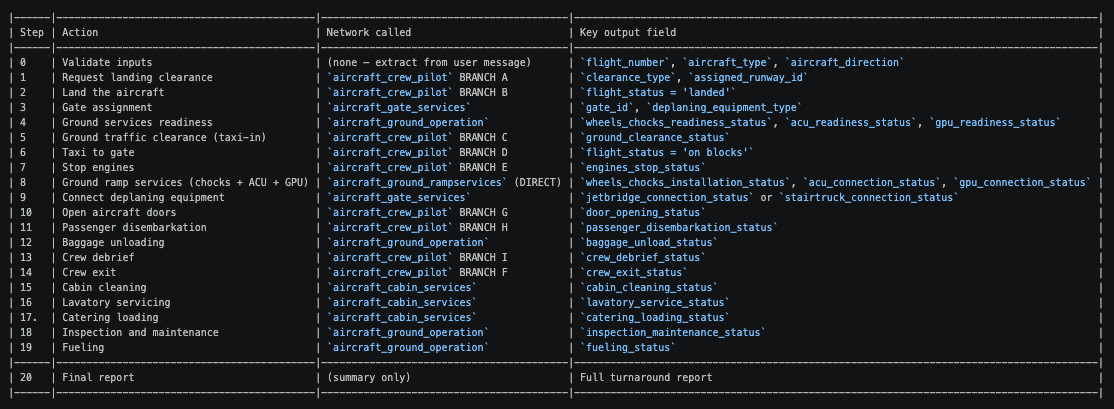
Each section examines a specific failure category, presenting the observed behavior, the underlying root cause, and the solution that resolved it. Rather than discussing best practices in the abstract, this tutorial provides a practical debugging guide based on real-world issues encountered while developing a production-grade hierarchical multi-agent system.
System Architecture Overview
AirlineTurnaround is built on the open-source agentic framework Neuro® San, where agent topologies are defined as version-controlled Human-Optimized Config Object Notation (HOCON) configurations. To execute a complex, safety-critical standard operating procedure, the architecture combines hierarchical orchestration, persistent state management, deterministic tool execution, and governance controls to ensure reliable, traceable execution.
The Agent-S (Agent-State) Pattern
Rather than relying on monolithic agent logic, AirlineTurnaround follows the Agent-S (Agent-State) Pattern, which models the workflow as a modular state machine. This architecture separates orchestration from execution while maintaining a persistent view of workflow state throughout the entire process.
- Separation of concerns: Tasks are routed through a lightweight Controller (Router) model that manages state transitions, while larger Executor (Worker) models perform reasoning, planning, or code execution.
- Persistent state management: TrackerAPI stores workflow state within the sly_data channel, providing execution memory that allows the orchestrator to track progress across the full 20-step protocol and recover reliably from interruptions.
Separating LLM Reasoning from Deterministic Execution
A key design principle of AirlineTurnaround is maintaining a clear boundary between probabilistic reasoning and deterministic system execution.
- Reasoning and execution: LLMs interpret natural language requests, determine intent, and decide which actions to perform. Business logic is executed through coded Python tools, ensuring deterministic behavior for critical operations.
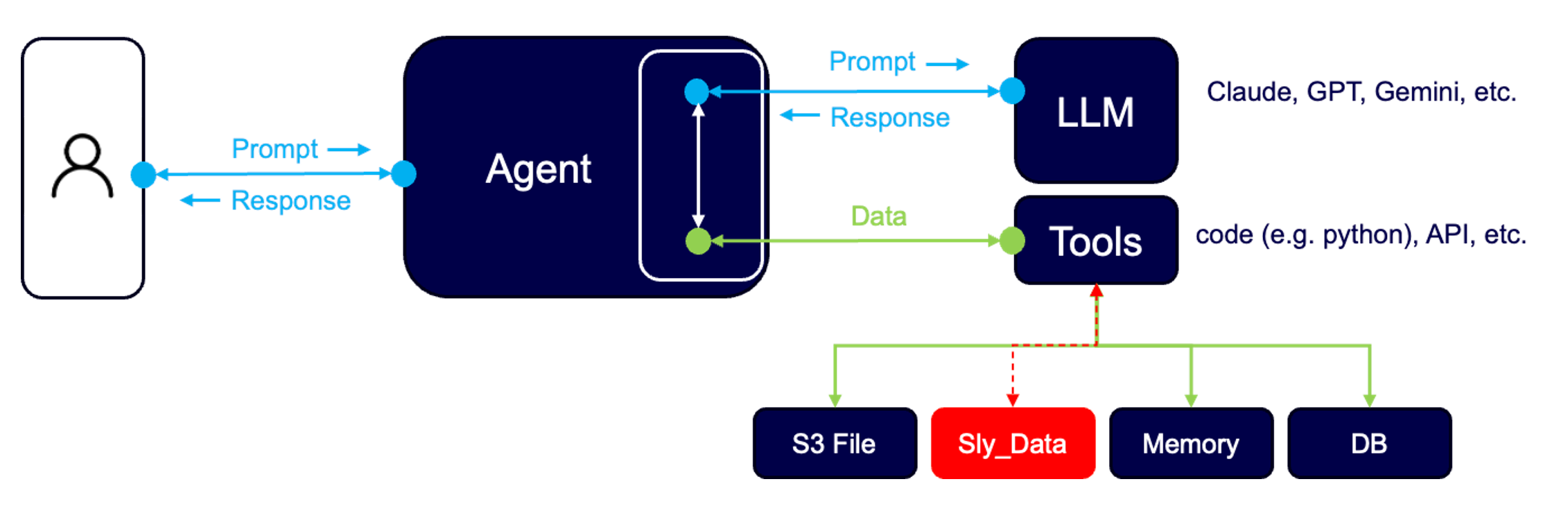
- The sly_data channel: Operational state, such as flight_status or gate_id, is exchanged through the private sly_data channel rather than embedded in conversational context. This reduces hallucinations, minimizes recency bias, and ensures structured state remains consistent throughout execution.
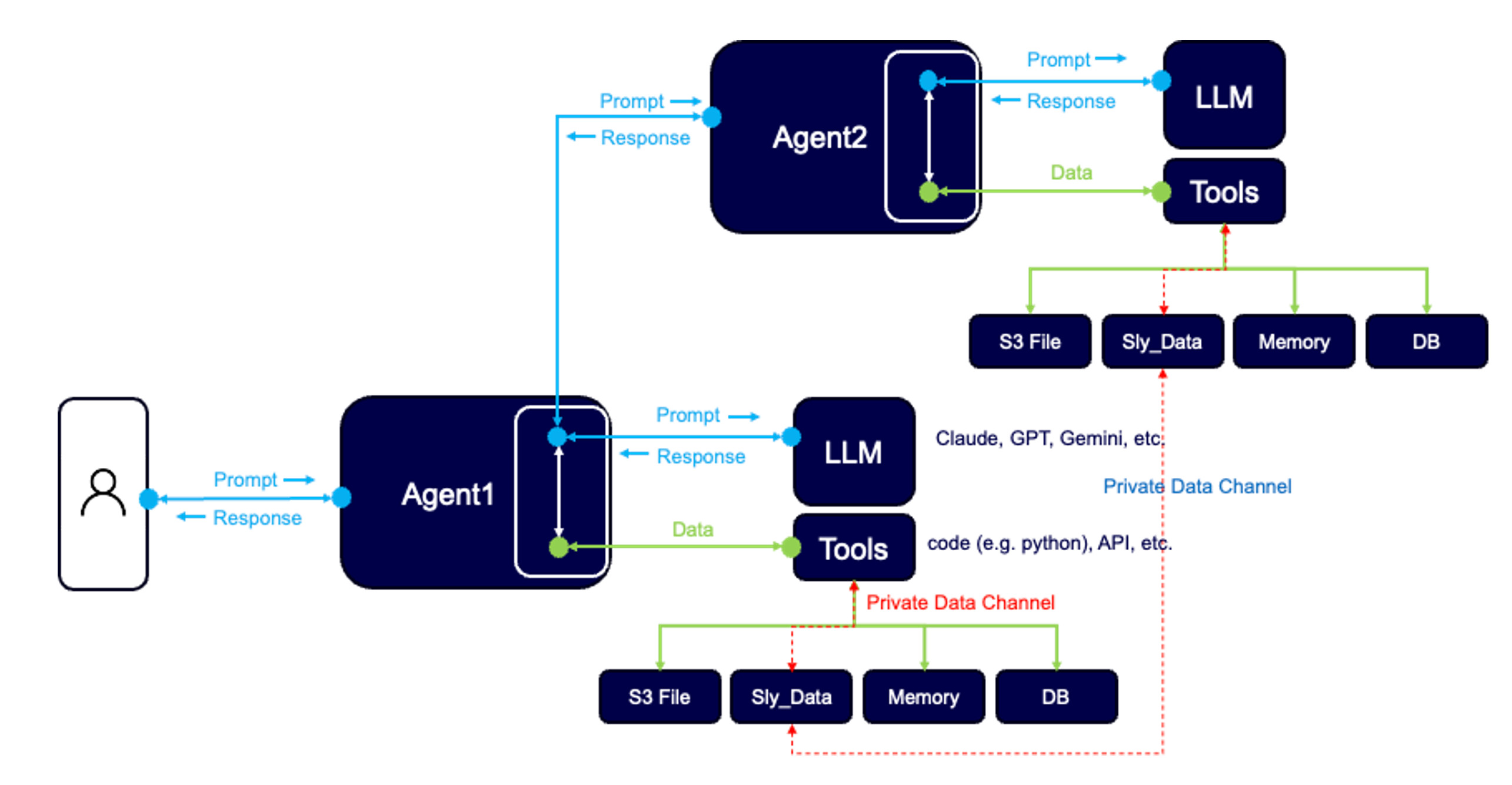
- Governed state exchange: When a coded tool executes, it receives the current workflow state, performs deterministic processing, and returns updated state to the orchestrator. This creates an execution model that remains predictable, auditable, and repeatable.
Hierarchical Execution and Modular Design
The AirlineTurnaround workflow is organized as a five-level hierarchy that progressively decomposes high-level objectives into atomic operations.
- Level 0: Top-level orchestrator (aircraft_turnaround) responsible for the complete 20-step workflow.
- Level 1: Functional orchestrators managing domains such as cabin services, pilot operations, ground operations, ramp services, and gate services.
- Level 2: Dependency orchestrators coordinating related subsystems, including ground_readiness, ground_rampservices, taxiing, crew_pilot, and crew_cabin.
- Level 3: Single-purpose service networks responsible for operations such as ACU connection, GPU connection, jetbridge connection, and door opening.
- Level 4: Atomic operators that perform individual tasks including engine shutdown, gate selection, and GPU setup.
Each layer performs a well-defined responsibility, creating a modular architecture whose components remain independently testable and idempotent.
SOP Data and Governance
Executing a safety-critical SOP requires more than orchestration alone. Every workflow transition is governed through explicit validation and state management. To prevent "blind" automation, we implemented:
Atomic Protocol Design: Business procedures are decomposed into explicit, sequential steps within HOCON configurations. Each step is a distinct task with its own mandatory validation gate.
Explicit State Validation: We utilize "Validation Gates" for every critical action. Each gate requires specific return values (e.g., status must contain 'connected') and includes retry logic if the output does not meet the safety-critical precondition.
- Audit Logging: Every reasoning trace and internal state update via TrackerAPI is captured, providing full observability into the agent's decision-making process.
Execution Principle
The system follows a modular execution model in which each building block is responsible for a specific task within a well-defined context. Input parameters are extracted either from the user prompt or read from the sly_data private data channel, with values from sly_data taking precedence. This approach ensures idempotent execution, meaning the same prompt can be executed multiple times without unintended side effects or unauthorized state changes.
Example: GPU Connection Cascade
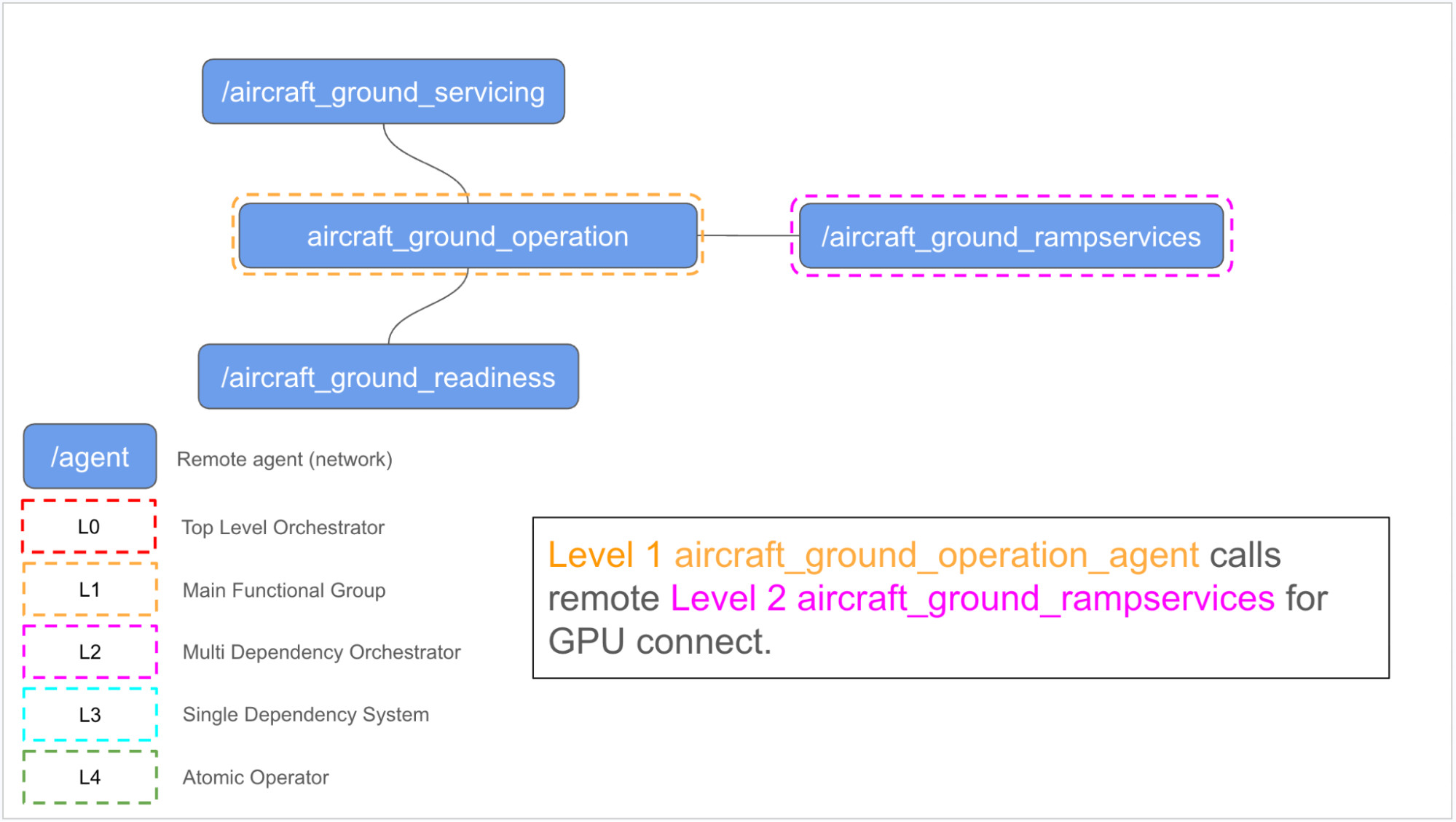
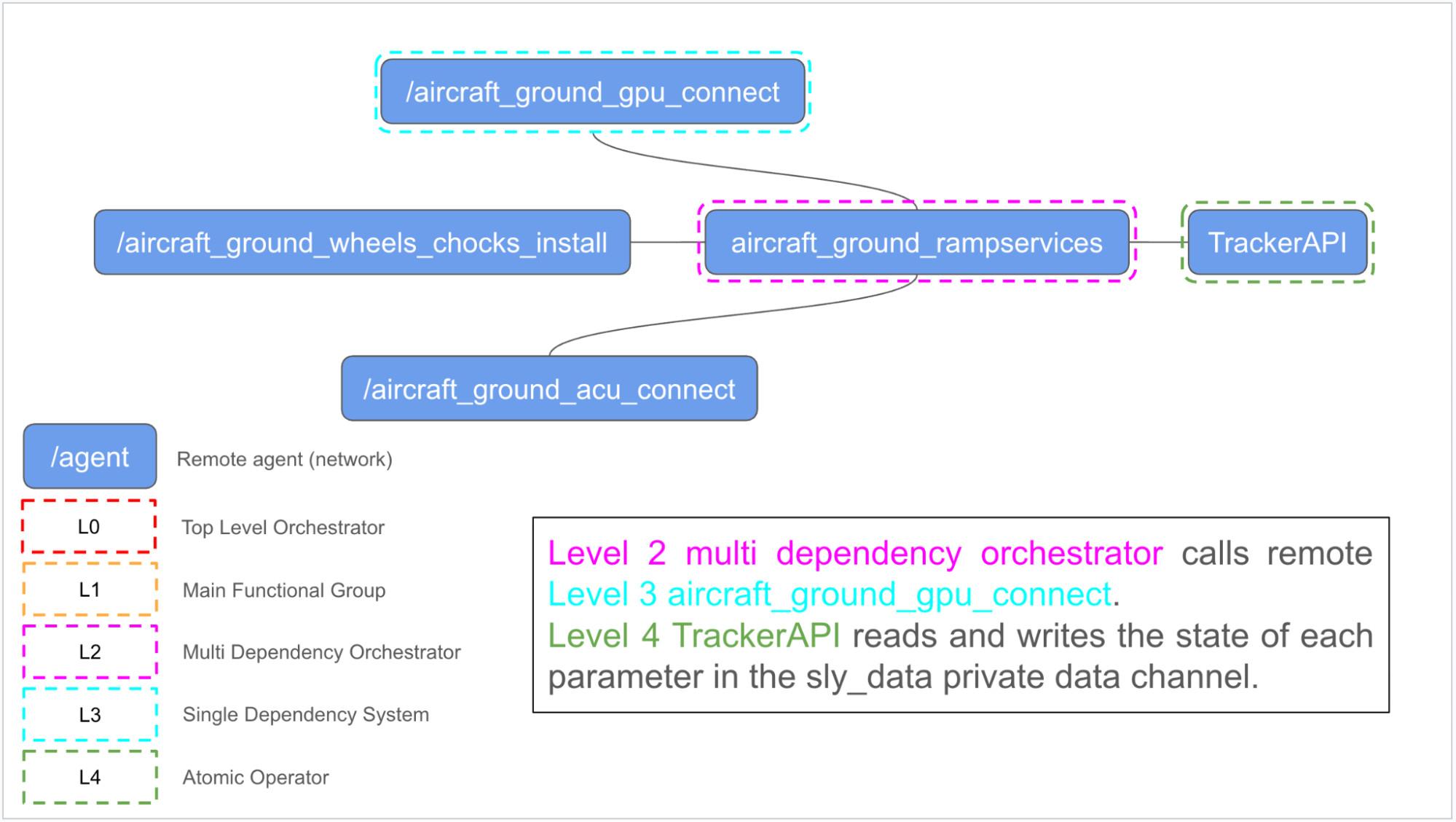
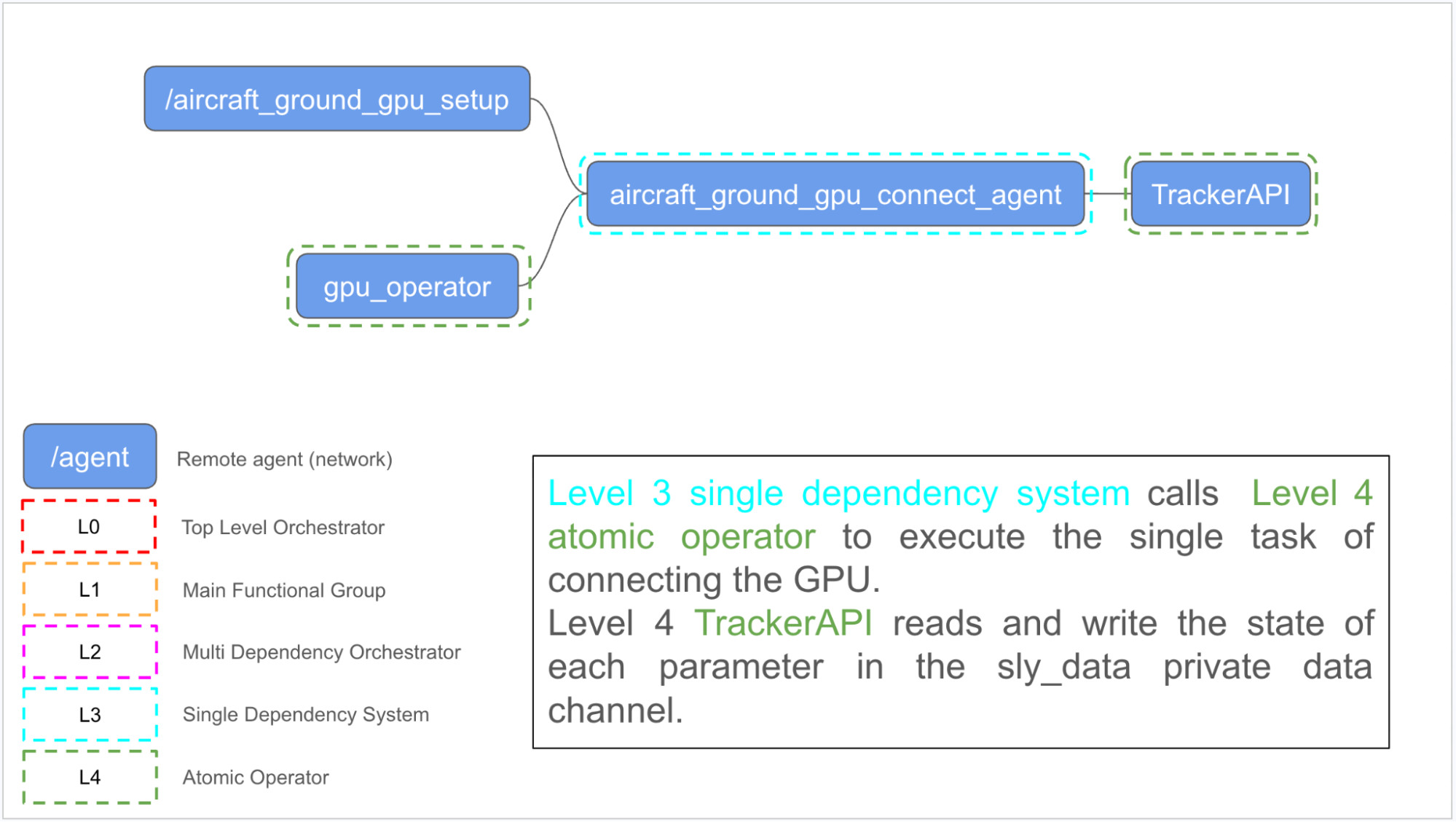
The GPU connection workflow illustrates how tasks are delegated through the hierarchy. When the Level 0 aircraft_turnaround_manager initiates a GPU connection request, responsibility cascades through successive orchestration layers until execution reaches the atomic gpu_operator, as shown in the figures below.
1. Level 0: aircraft_turnaround_manager initiates the command to connect the GPU to the aircraft and delegates the request to the Level 1 aircraft_ground_operation functional group.
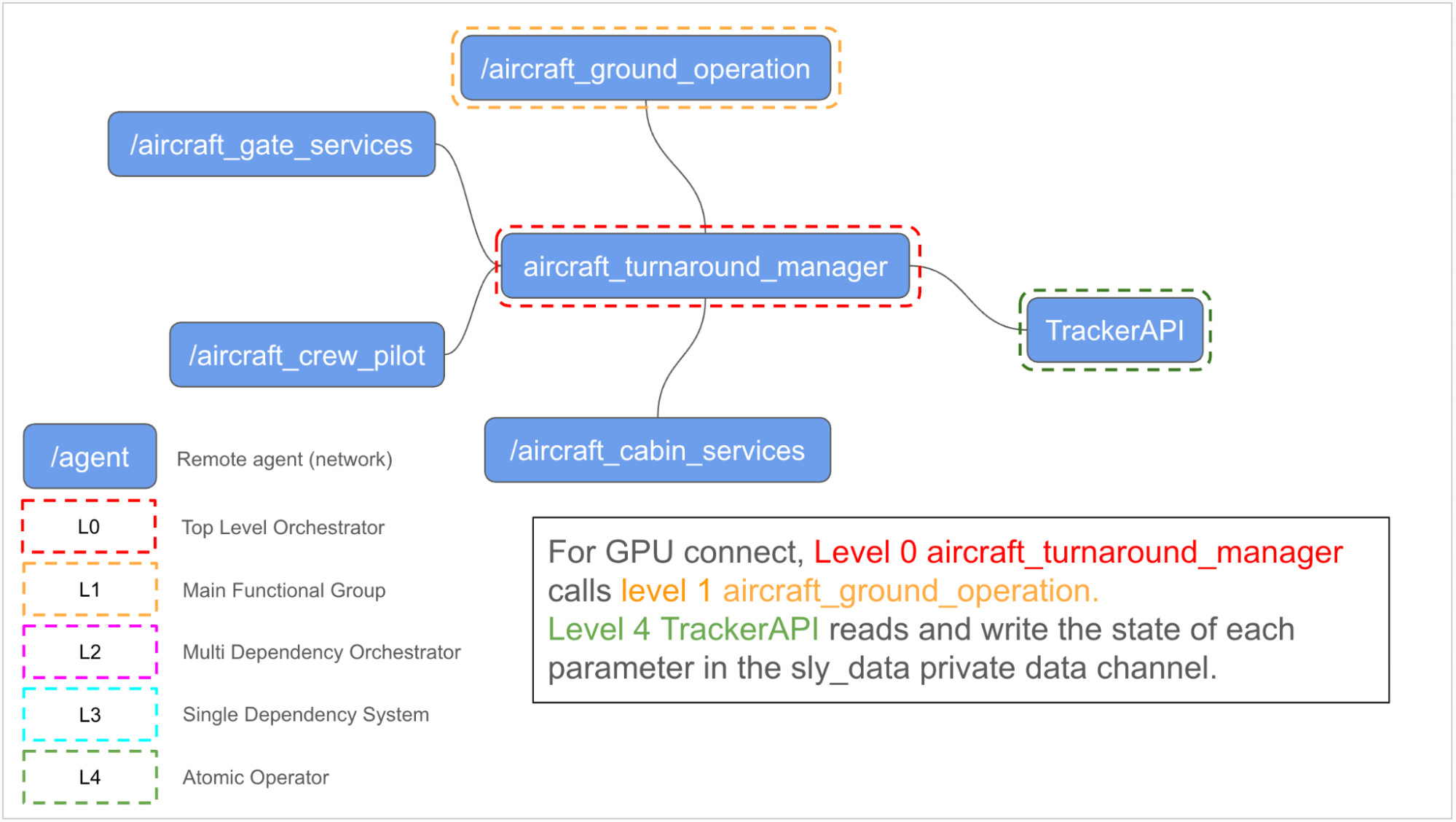
2. Level 1: aircraft_ground_operation forwards the task to the Level 2 aircraft_ground_rampservices multi-dependency orchestrator.
3. Level 2: aircraft_ground_rampservices invokes the Level 3 aircraft_gpu_connect single-dependency network.
4. Level 3: aircraft_gpu_connect delegates execution to the Level 4 atomic gpu_operator, which performs the GPU connection.
Several GPT and Claude models were evaluated during the development of this agentic network, each exhibiting slight differences in orchestration behavior. The implementation presented in this tutorial uses GPT-5.4-mini across all agents.
Why Higher-Level Agents Fail More Often
Leaf agents perform narrowly scoped tasks and generally execute reliably. As orchestration moves up the hierarchy, however, failures become increasingly common for several structural reasons that required extensive debugging to uncover:
- Long-running, multi-step workflows cause LLMs to drift from the intended execution sequence.
- State exchanged through TrackerAPI can become stale, be misinterpreted, or be inadvertently overwritten.
- Agent routing depends on the LLM selecting the correct tool, making it susceptible to recency bias and semantic confusion.
- Orchestrators may continue execution before long-running sub-agents have completed, resulting in asynchronous execution errors.
Failure 1: Orchestrator Over-Delegation
The Problem
The original aircraft_turnaround.hocon instructed the top-level manager to make a single call to aircraft_turnaround_operator and wait for the final result. That operator contained the entire 20-step turnaround procedure as one long sequence of instructions.
What Happened
Instead of executing the complete workflow, the LLM frequently stopped after completing the first successful sub-task and generated a final report claiming that all 20 steps had finished successfully. In other cases, it hallucinated progress through intermediate steps without issuing the required tool calls.
Root Cause
When presented with a long sequence of numbered tasks, LLMs commonly fail in one of two ways. They either stop after the first successful task or infer that subsequent tasks have been completed without actually executing them. Because the top-level manager delegated the entire workflow to a single sub-agent, it had no visibility into individual step execution and therefore could not detect these failures.
The Fix
Rather than delegating the entire workflow, the top-level manager now owns the full 20-step protocol directly. Each step explicitly defines:
- The agent to invoke
- The parameters to pass
- The state variables to store
- Validation conditions that must be satisfied before proceeding
The manager is also prohibited from advancing until every subsystem explicitly confirms successful completion.
Before
# Before (over-delegated)

aircraft_turnaround_manager instructions:

1. Call aircraft_turnaround_operator and wait for the full turnaround report.
After
# After (manager owns the protocol)

aircraft_turnaround_manager instructions:

STEP 1 - Request landing clearance
  - Call /AirlineTurnaround/aircraft_crew_pilot with named parameters:
      flight_number
      aircraft_type
      flight_status
      task_id='STEP_1_LANDING_CLEARANCE'

  - Wait for response.
  - Extract and store: landing_clearance_status.
  - VALIDATION:
      landing_clearance_status MUST contain 'cleared'.
  - Do not proceed to STEP 2 until
      clearance_type contains 'CLEARED'
      and assigned_runway_id is not None.

STEP 2 - Land the aircraft
...
Best Practice
For multi-step workflows, the orchestrator should own the execution protocol explicitly rather than delegating the entire sequence to a single opaque sub-agent. Every step should define its execution conditions, validation gates, and proceed or stop criteria. For highly deterministic workflows, implementing the orchestration logic directly in code may provide greater reliability than relying entirely on LLM reasoning.
Failure 2: Routing Failures from Vague Agent Descriptions
The Problem
Several agents incorrectly responded with "I'm not relevant to this inquiry" when given valid requests. The most common example occurred when aircraft_crew_pilot rejected the request: Request clearance for landing.
What Happened
The request was routed to the wrong logic before the agent's instructions were even evaluated.
The observed interaction was:
User prompt to manager: "Request clearance for landing."
aircraft_crew_pilot response: "I'm not relevant to this inquiry."
Root Cause
Three separate issues combined to produce this behavior.
Issue 1: The agent description was too generic.
The original description only stated:
# Before:
"description": "I am in charge of operating the aircraft in all phases of flight."
The orchestrator relies primarily on an agent's function.description to determine which tool to invoke. Because the description never mentioned landing clearance, the manager failed to associate the request with the correct agent. The "not relevant"response was therefore generated upstream before the agent's workflow was even executed.
Issue 2: The relevance check was too restrictive.
The instructions contained an early exit condition:
1a. If not relevant to operating the aircraft,
    reply "not relevant" and stop.
Without additional context, a short request such as "Request clearance for landing" could incorrectly trigger this exit path.
Issue 3: The prompt contained an ambiguous trigger.
One routing condition mistakenly contained duplicated wording:
4. If the inquiry is about requesting
"air traffic clearance" clearance for landing...
The repeated word reduced the likelihood that simpler user phrasing would match the intended branch.
The Fix
Three changes resolved the issue.
First, the agent description was rewritten to explicitly enumerate every capability handled by the agent using the same vocabulary that callers are expected to use.
Second, the routing logic was inverted so that relevance is assumed by default. The agent now exits only if none of its supported branches match.
Finally, the trigger phrases were simplified to recognize a broader range of natural language requests.
Before
"description":
"I am in charge of operating the aircraft in all phases of flight."
After
"description": """
I am in charge of operating the aircraft in all phases of flight.

I handle the following tasks:

- Request air traffic clearance for landing
  (clearance for landing)

- Land the aircraft

- Request ground traffic clearance
  to taxi in or taxi out

- Taxi the aircraft to or from the gate

- Stop the aircraft engines

Call me for any of these flight crew operations.
"""
Best Practice
Treat an agent's function.description as its routing contract. It should explicitly enumerate every task the agent is responsible for using the same terminology its callers will use. If the description is too generic, the orchestrator may never invoke the correct agent, regardless of how well the agent's internal instructions are written.
Failure 3: Restart Loops from State Misinterpretation
The Problem
The system completed Steps 1 through 8 successfully, then restarted from Step 1 during Step 9. This happened three times, each time with a different gate assignment: A16, A36, and A2. The final report listed gate A2, even though A16 was the original assigned gate.
What Happened
The logs showed a parallel tool call without waiting for the first response to complete.
Invoking: aircraft_baggage_unload  (params: gate A16, pax_status=completed)
Invoking: aircraft_crew_pilot      (STEP_1_LANDING_CLEARANCE ← RESTART!)

Note: No 'Got result from aircraft_baggage_unload' line between these two.
Root Cause
Two issues combined to create the restart loop.
First, the LLM issued two tool calls in the same generation turn: aircraft_baggage_unload and STEP_1_LANDING_CLEARANCE. It did not wait for aircraft_baggage_unload to return before starting a new task.
Second, when TrackerAPI returned a full state snapshot after a step, the manager misread historical fields such as passenger_disembarkation_status = 'completed' as a reason to re-evaluate the workflow from the beginning. This caused the manager to restart from Step 1 instead of continuing to the next incomplete step.
The gate changed on each restart because aircraft_gate_services was stateless. When called with only flight_number and aircraft_type, it dynamically selected the best available gate each time.
The Fix
The fix introduced three safeguards:
- Add a global rule requiring exactly one tool call per turn.
- Add an await guard at Step 12 for baggage unload, preventing the manager from issuing any other tool call until the sub-agent responds.
- Lock the assigned gate after Step 3 so it cannot change later in the turnaround.
# Global rule added to CRITICAL EXECUTION RULES:
5. NEVER issue two tool calls in the same turn. Each turn must contain
   exactly ONE tool call. Wait for the response before issuing the next.
   If you find yourself about to call two tools at once, stop — issue
   only the first and wait.


# STEP 12 await guard:
- CRITICAL: This step involves a sub-agent that may take time to respond.
  YOU MUST STOP ALL OTHER ACTIVITY AND WAIT for the response from
  aircraft_baggage_unload before issuing ANY other tool call.
  Do NOT issue any other call in parallel.


# STEP 3 gate lock:
- CRITICAL: Once gate_id is assigned, it MUST NOT change for the
  remainder of this turnaround. Do not call aircraft_gate_services again.
  If you find yourself at STEP 3 a second time, you are in an error
  loop — stop and report: 'STEP 3 ERROR: gate already assigned.'
Best Practice
Sequential workflows should explicitly prohibit parallel tool calls. Add a global one-tool-call-per-turn rule, then reinforce it with step-level await guards for long-running sub-agents. Any stateful assignment, such as gate selection, should also be locked after the first valid assignment or implemented as an idempotent operation.
Failure 4: Instruction-Following Drift
The Problem
Step 10, which opens the aircraft doors, consistently called aircraft_crew_pilot instead of aircraft_crew_cabin, even though the HOCON configuration explicitly instructed the manager to call /AirlineTurnaround/aircraft_crew_cabin. The pilot agent correctly responded that the request was not relevant, and the manager gave up after two retries.
What Happened
aircraft_turnaround_manager: Invoking __AirlineTurnaround__aircraft_crew_pilot
  with {task_id: 'STEP_10_DOOR_OPENING', instruction: 'Open the aircraft door.', ...}
aircraft_crew_pilot response: 'I'm not relevant to this request.'  (correct refusal)
Manager retried same wrong agent → same failure → gave up.
Root Cause
Three factors contributed to the wrong routing decision.
- Recency bias: Steps 5, 6, 7, and 14 all call aircraft_crew_pilot. By Step 10, the model had a strong bias toward that tool and selected it again, even though the instruction named a different agent.
- Semantic confusion: The phrase “Open the aircraft door” can sound like a pilot action. The model’s learned assumptions conflicted with the explicit tool-routing instruction.
- Context window pressure: By Step 10, the context already included nine completed steps plus TrackerAPI exchanges. The specific tool name aircraft_crew_cabin became easier to miss in the larger context.
The Fix
The fix added a direct negative constraint to Step 10, introduced a routing cheatsheet near the top of the manager instructions, and clarified the aircraft_crew_cabin description so its ownership of cabin-related tasks was unambiguous.
- Fix 1 (highest impact): Add negative constraint directly in Step 10 instruction.
- Fix 2: Add a TOOL ROUTING CHEATSHEET at the top of manager instructions.
- Fix 3: Rename aircraft_crew_cabin's description to make its ownership unambiguous.
# Fix 1 — Step 10 negative constraint:
STEP 10 - Open aircraft doors (via cabin crew agent)
  - CRITICAL: Call /AirlineTurnaround/aircraft_crew_cabin — NOT aircraft_crew_pilot.
    The pilot is NOT involved in door opening. Using aircraft_crew_pilot will return
    'not relevant' because it has no DOOR_OPENING branch.


# Fix 2 — Routing cheatsheet at top of manager instructions:
TOOL ROUTING CHEATSHEET (override model priors):
  Door opening   → aircraft_crew_cabin  (STEP 10)
  Pax disembark  → aircraft_crew_cabin  (STEP 11)
  Crew debrief   → aircraft_crew_cabin  (STEP 13)
  All others     → aircraft_crew_pilot
Best Practice
For steps where recency bias or semantic confusion can cause the model to select the wrong agent, add an explicit negative constraint naming the incorrect agent and explaining why it fails. A routing cheatsheet near the top of the orchestrator instructions gives the model a concise reference point without requiring it to scan the full 20-step protocol.
Failure 5: Tool List Bloat
The Problem
After fixing the Step 10 routing issue, the next question was whether the top-level aircraft_turnaround_manager should still list tools such as /AirlineTurnaround/aircraft_door_opening and /AirlineTurnaround/aircraft_disembark in its tools array, even though those agents were meant to be called internally by aircraft_crew_cabin.
Analysis
Across the full 20-step workflow, the manager never called aircraft_door_opening, aircraft_disembark, aircraft_crew_debrief, or aircraft_crew_exit directly. Those agents were internal to either aircraft_crew_cabin or aircraft_crew_pilot.
Keeping them visible in the manager’s tools list created unintended bypass paths. The manager could potentially call those internal sub-agents directly, skipping the intended routing through the cabin or pilot agents.
The Fix
The tools list was trimmed to include only agents the manager is authorized to call directly. Four entries were removed:
- aircraft_door_opening
- aircraft_disembark
- aircraft_crew_debrief
- aircraft_crew_exit
This reduced the manager’s tools list from 13 entries to 9, with each remaining tool mapped directly to at least one step in the manager’s instructions.
Best Practice
Treat an orchestrator’s tools array as an access-control boundary, not an inventory of every available agent. If the orchestrator should not call a tool directly, remove it from the list. Hidden tools cannot be accidentally invoked, which helps enforce encapsulation and prevents bypassing the intended hierarchy.
Failure 6: Positional Args Wrapping
The Problem
After the system ran cleanly through all 20 steps, inspection of Steps 15, 16, and 17 showed that aircraft_cabin_services was receiving parameters as a positional args list instead of named key-value pairs. This violated the expected HOCON calling convention.
What Happened
{"args": [{"flight_number": "AF84", "instruction": "Clean the aircraft cabin.", ...}]}

Expected: named key-value pairs at the top level, not wrapped in an args list.
The workflow still succeeded because the sub-agent was flexible enough to unpack the positional list. However, this created a fragile implementation. A stricter sub-agent version, schema change, or parameter-order dependency could break the workflow silently.
Root Cause
The model had learned the wrong calling pattern and continued applying it even when the workflow completed successfully. Positive instruction alone was not enough to correct the behavior because the model needed to recognize the exact anti-pattern it was producing.
The Fix
The affected steps were updated with explicit correct and incorrect examples. Instead of only telling the model to use named parameters, the instructions showed both the wrong args wrapper and the correct top-level key-value structure.
- Add a CRITICAL note at the top of each affected step.
- Include both the wrong pattern and the correct pattern so the model can recognize what to avoid.
# Steps 15, 16, 17 reinforcement:
CRITICAL: Pass ALL parameters as named key-value pairs at the top level.
DO NOT wrap them in an 'args' list.
WRONG:  {"args": [{"flight_number": "AF84", "instruction": "..."}]}
RIGHT:  {"flight_number": "AF84", "instruction": "...", ...}
Best Practice
When a model repeatedly uses the wrong calling convention, show the incorrect pattern alongside the correct one. Naming the exact structure the model is producing gives it a concrete pattern to avoid, which is often more effective than positive instruction alone.
Failure 7: Token Inflation from Verbose Sub-Agent Responses
The Problem
When the system was switched from GPT-5.4-mini to Claude Haiku 4.5, sub-agents began returning much longer responses. They added markdown headers, bullet points, emoji, and conversational text around the structured return summary.
This increased token usage by three to five times per step, consuming the context window much faster and contributing to restart-loop behavior.
What Happened
During testing, the same full workflow produced significantly different runtimes depending on the model:
AirlineTurnaround complete cycle with gpt-5.4-mini:
2-4 minutes

AirlineTurnaround complete cycle with claude-haiku-4-5:
about 14 minutes
Root Cause
The original HOCON instructions had been tuned around the more concise response style of GPT models. When the system was tested with Claude Haiku 4.5, the model produced more conversational, markdown-heavy output by default.
Because the architecture includes multiple orchestration layers and frequent sub-agent calls, the additional response text compounded quickly. This reduced effective context headroom and increased the risk that the manager would lose track of the workflow state.
The Fix
A strict response-format block was added to the instructions of all ten sub-agents:
- aircraft_crew_pilot
- aircraft_traffic_controller
- aircraft_gate_services
- aircraft_gate_selection
- aircraft_jetbridge_connect
- aircraft_stairtruck_connect
- aircraft_ground_operation
- aircraft_ground_rampservices
- aircraft_cabin_services
- aircraft_lavatory_service
The block requires each agent to return only the structured return summary, with no extra prose or formatting.
"instructions": """
RESPONSE FORMAT — STRICT:
  Return ONLY the structured RETURN SUMMARY block defined at the end of the instructions.
  Do NOT add explanatory prose, markdown headers (##, **), bullet points,
  emoji, or conversational text before or after the summary block.
  The summary block starts with the *** banner line and ends with the last ** field **.
  Nothing else should appear in your response.

..."""
Best Practice
Treat response format as a contract between each sub-agent and its calling manager. Format constraints should be included from the beginning, not added only after switching models. When moving between LLM providers, measure token consumption per step before deploying a long-running workflow, since differences in verbosity can significantly reduce available context and destabilize orchestration.
Failure 8: Workflow Restart Before Completion
The Problem
After successfully completing 15 or more of the 20 workflow steps, the aircraft_turnaround_manager occasionally restarted from Step 1 without reporting an error. Instead of completing the remaining tasks, the workflow entered a restart loop until it exhausted its iteration budget.
What Happened
During testing, these restarts prevented the workflow from producing a final report, despite most of the turnaround having already completed.
Root Cause
After a long sequence of steps, Claude Haiku 4.5 occasionally lost track of its position in the workflow and reinterpreted the original user prompt as a new request. This behavior was amplified by the increased verbosity of sub-agent responses, which consumed significantly more tokens than the previous GPT-based implementation.
As earlier workflow steps were pushed out of the effective context window, the manager no longer had a reliable record of completed milestones and incorrectly restarted the protocol from Step 1.
The Fix
A global restart guard was added at the beginning of the workflow in aircraft_turnaround.hocon. The guard applies to every step from Step 1 through Step 20 and instructs the manager to:
- Never re-read or re-evaluate the original user request after the workflow has started.
- Never restart from Step 0 once progress has been made.
- Check the current working context before executing each step.
- Skip any step whose outputs are already present and continue with the next incomplete step.
Although the issue was first observed after Step 15, the restart guard was applied globally to improve robustness across the entire workflow.
"instructions": """
...

GLOBAL RESTART GUARD — applies from STEP 1 through STEP 20:
  After completing any step N, you MUST proceed directly to STEP N+1.
  NEVER re-read or re-evaluate the original user input mid-sequence.
  NEVER restart from STEP 0 after any step has been completed.

  Before executing any step, check your working context:
    - If gate_id is already stored    → STEP 3 is done. Do NOT re-execute STEP 3.
    - If flight_status='on blocks'    → STEPs 1-6 are done. Do NOT re-execute them.
    - If engines_stop_status='stopped'→ STEP 7 is done. Do NOT re-execute it.
    - If cabin_cleaning_status='completed' → STEP 15 is done. Proceed to STEP 16.
    - If lavatory_service_status='completed' → STEP 16 is done. Proceed to STEP 17.
    - If catering_loading_status='completed' → STEP 17 is done. Proceed to STEP 18.

  If you find yourself about to execute a step whose outputs are already stored
  in your working context, SKIP it and advance to the next incomplete step.

  A restart loop is a critical failure — detecting one and self-correcting is
  preferable to completing the turnaround incorrectly.

..."""
Best Practice
Long-running agentic workflows should include a global sequence guard that prevents unintended restarts and verifies progress before each step. Position this guard near the beginning of the instruction set so it remains within the model's active context window throughout execution. When evaluating different LLM providers, benchmark both token consumption and workflow stability, since increased verbosity can significantly reduce effective context headroom and make long-running orchestrations more susceptible to restart loops.
Failure 9: Workflow Task Misrouting
The Problem
The AirlineTurnaround workflow failed at Step 9, where deplaning equipment, either a jetbridge or stairtruck, should be connected to the aircraft after it arrives at the gate. The workflow returned: “deplaning equipment could not be connected, Equipment type: jetway.”
The issue was not that the validation gate was wrong. The validation gate correctly blocked the workflow from continuing. The problem was that aircraft_gate_services returned the wrong branch output. Instead of returning a jetbridge connection status, it returned a gate selection summary.
What Happened
The aircraft_gate_services agent routed the Step 9 call to Branch A, which handles gate assignment, instead of Branch B, which handles jetbridge connection. Because the Step 9 call did not include a task_id, the sub-agent had to infer the intended action from the instruction text alone. It matched “Connect the jetbridge” to the broader gate services context and selected the wrong branch.
Root Cause
This was a routing ambiguity issue. aircraft_gate_services supports more than one function, and both branches use related airport operations language. Without a task_id, the model relied on natural language matching and selected the wrong path.
The Fix
The Step 9 call was updated to include task_id='STEP_9_CONNECT_DEPLANING_EQUIPMENT'. The aircraft_gate_services routing logic was also updated so that task_id is checked first, before instruction text or inquiry text. This makes the routing decision explicit and prevents the model from choosing the gate assignment branch when the workflow needs deplaning equipment connection.
# UPDATED IN AIRCRAFT TURNAROUND HOCON FILE
            "instructions": """
...

STEP 9 - Connect deplaning equipment (jetbridge or stairtruck)
  - Check deplaning_equipment_type from your working context (set at STEP 3):
      - 'jetway' or 'jetbridge' → use instruction='Connect the jetbridge.'
      - 'stairtruck' or 'stair' → use instruction='Connect the stairtruck.'
      - unknown → default to instruction='Connect the jetbridge.'
  - Call /AirlineTurnaround/aircraft_gate_services with named parameters:
      flight_number, aircraft_type, flight_status, gate_id,
      acu_connection_status, gpu_connection_status,
      wheels_chocks_installation_status, deplaning_equipment_type,
      task_id='STEP_9_CONNECT_DEPLANING_EQUIPMENT',
      instruction=<determined above>

..."""
# UPDATED IN AIRCRAFT GATE SERVICES HOCON FILE
"instructions": """
...
─────────────────────────────────────────────────────────────
ROUTING — check task_id FIRST, then instruction, then inquiry text.
─────────────────────────────────────────────────────────────
STEP 0 — Routing (mandatory, always executed first):
If task_id contains 'GATE_ASSIGNMENT' → BRANCH A. NEVER return not relevant.
If task_id contains 'CONNECT_DEPLANING_EQUIPMENT' → BRANCH B. NEVER return not relevant.
If task_id is absent or does not match, fall back to instruction/inquiry text:
instruction or inquiry contains 'assign', 'select', 'gate' → BRANCH A
instruction or inquiry contains 'connect', 'jetbridge', 'stairtruck' → BRANCH B
If no match at all, reply you are not relevant and stop.
A task_id is an explicit dispatch — NEVER return not relevant when task_id is present.
..."""Best Practice
For sub-agents with multiple branches, use task_id as the authoritative routing signal. Natural language instructions can be ambiguous, especially when different branches share related vocabulary. Branch return summaries should also echo the task_id so the calling manager can verify that the correct branch executed.
Failure 10: Workflow Step Skipping
The Problem
The AirlineTurnaround workflow failed at Step 7 with the message "engines could not be stopped", returning a raw response of "failed." The aircraft_crew_pilot sub-agent rejected the engine stop request because flight_status was "landed" rather than "on blocks", which is the required precondition for engine shutdown.
What Happened
During execution, the manager successfully completed Step 5 (ground clearance granted) but skipped Step 6 (taxi to gate) entirely. It then proceeded directly to Step 7 using the stale flight_status value of "landed".
The model incorrectly inferred that obtaining ground clearance implied the aircraft had already taxied to the gate. As a result, it attempted to stop the engines before the aircraft had reached the required "on blocks" state. The existing progression guard at Step 6 was ineffective because the manager bypassed the entire step instead of failing within it.
Root Cause
The workflow relied on an exit condition at Step 6 to prevent progression. However, because the LLM skipped Step 6 altogether, that guard was never evaluated. There was no prerequisite check at the beginning of Step 7 to verify that the required workflow state had actually been reached.
The Fix
A prerequisite check was added to the beginning of Step 7. Before invoking any sub-agent, the manager now verifies that flight_status in the working context contains "on blocks". If not, it returns to Step 6 and completes the taxi operation before attempting to stop the engines.
The sub-agent call was also updated to explicitly pass flight_status='on blocks', making the expected state unambiguous.
# UPDATED IN AIRCRAFT TURNAROUND HOCON FILE

            "instructions": """
...

STEP 7 - Stop engines
  - PREREQUISITE CHECK: Before calling any sub-agent, verify that flight_status
    in your working context contains 'on blocks'.
    If flight_status does NOT contain 'on blocks', you have NOT completed STEP 6.
    Go back and execute STEP 6 (taxi to gate) before proceeding here.
    Do NOT call aircraft_crew_pilot for engine stop with any flight_status
    other than 'on blocks' — the sub-agent will reject it and the step will fail.

..."""
Best Practice
Place prerequisite checks at the beginning of a workflow step, not just at the end of the preceding step. Exit guards can be bypassed if the model skips a step entirely, whereas entry guards ensure the required state is validated immediately before execution. For safety-critical workflows, prerequisite checks should both verify the current state and provide explicit instructions for recovering from skipped steps.
Failure 11: Validation Gate Failure
The Problem
The AirlineTurnaround workflow completed and produced a final report, but the GPU Connection field showed “not connected yet” instead of “connected.” Despite this incomplete status, the workflow continued through downstream steps, including door opening, passenger disembarkation, and fueling.
What Happened
The workflow completed even though a gating mid-step had not been confirmed successfully. In Step 8, aircraft_turnaround.hocon called aircraft_ground_rampservices and extracted three key values:
- gpu_connection_status
- wheels_chocks_installation_status
- acu_connection_status
However, the step did not include validation gates for these outputs. When gpu_connection_status returned an intermediate value, the manager stored it and advanced to Step 9 instead of retrying or stopping.
Root Cause
The workflow assumed that extracting a status value was enough to confirm successful completion. Because Step 8 did not explicitly require gpu_connection_status to contain "connected", the manager treated an incomplete intermediate state as acceptable and continued execution.
The Fix
Validation gates were added to Step 8 for all three ramp service statuses. The workflow now requires:
- wheels_chocks_installation_status to contain "installed"
- acu_connection_status to contain "connected"
- gpu_connection_status to contain "connected"
Each gate includes a retry condition and a hard stop with a specific failure message if the expected status is not returned.
# UPDATED IN AIRCRAFT TURNAROUND HOCON FILE
            "instructions": """
...

STEP 8 - Ground ramp services (wheelchocks install + ACU connect + GPU connect)
  - Call /AirlineTurnaround/aircraft_ground_rampservices directly with named parameters:
      flight_number, aircraft_type, gate_id, flight_status, engines_stop_status,
      wheels_chocks_readiness_status, acu_readiness_status, gpu_readiness_status,
      instruction='Execute ground ramp services.'
  - Do NOT route this through aircraft_ground_operation.
  - Wait for response.
  - Extract and store: wheels_chocks_installation_status, acu_connection_status, gpu_connection_status.
  - VALIDATION — wheelchocks: wheels_chocks_installation_status MUST contain 'installed'.
    If not, retry ONCE with the same parameters.
    If still not 'installed' after retry, stop and report:
      "STEP 8 FAILED: wheelchocks installation did not complete.
       Raw response: [wheels_chocks_installation_status]"
  - VALIDATION — ACU: acu_connection_status MUST contain 'connected'.
    If not, retry ONCE with the same parameters.
    If still not 'connected' after retry, stop and report:
      "STEP 8 FAILED: ACU could not be connected.
       Raw response: [acu_connection_status]"
  - VALIDATION — GPU: gpu_connection_status MUST contain 'connected'.
    If not, retry ONCE with the same parameters.
    If still not 'connected' after retry, stop and report:
      "STEP 8 FAILED: GPU could not be connected.
       Raw response: [gpu_connection_status]"
  - Do NOT proceed to STEP 9 until all three statuses are confirmed:
      wheels_chocks_installation_status contains 'installed'
      acu_connection_status contains 'connected'
      gpu_connection_status contains 'connected'

..."""
Best Practice
Safety-critical preconditions must be enforced through explicit validation gates, not inferred from the presence of a response. Any output required by downstream steps should be treated as a hard gate. Intermediate values such as “in progress” or “not connected yet” should trigger a retry or stop condition rather than being stored as acceptable progress.
Summary: Failure Categories and Fixes
The table below summarizes the main failure categories identified during debugging and the fixes applied.
Category | Root Cause | Fix Applied |
Over-Delegation | Manager delegated 20-step protocol to opaque sub-agent; LLM short-circuited | Manager owns protocol directly with STEP N labels and VALIDATION guards |
Vague Agent Description | function.description too generic; orchestrator never routed to agent | Enumerate every capability using caller's exact vocabulary |
Snapshot Misreading / Restart Loop | LLM restarted from Step 1 after reading historical state in TrackerAPI snapshot | Single-call-per-turn rule; await guards; gate lock after assignment |
Instruction-Following Drift | Recency bias and semantic confusion caused LLM to call wrong agent | Negative constraints + routing cheatsheet in orchestrator instructions |
Bloated Tool List | Unused tools created bypass paths around encapsulated sub-agents | Tools list = direct-call agents only; remove internal sub-agents |
Positional Args Wrapping | LLM wrapped params in args list instead of named key-value pairs | Show both wrong and right pattern explicitly in step instructions |
Sub-Agent verbosity with claude haiku (compared to gpt mini) | Context window fills faster and introduces LLM instability that leads to restart from previous step rather than advancing to the next step. | Add instruction block to constrain the RESPONSE FORMAT STRICT to lower token consumption. |
Workflow restart before completion of last step | Workflow length, sub-agents count and multi-level depth speed the context window filling resulting in restart before full completion. | Add a global restart guard with checks and validation at transition from every step to the next across the workflow. |
Misrouting of task in workflow | Absence of task_id weakens sub-agent robustness at handling instruction text to route on. The LLM can mismatch contexts and activate the wrong branch in the workflow. | Add task_id to step call to remove ambiguity. |
Skipping of workflow step | The workflow existing progression guards are not sufficient to clear instruction ambiguity. | Add a prerequisite check at the top of workflow step instruction to explicitly verify guard value in working context before any sub-agent call is made. |
Failure to comply with workflow logic | Absence of validation gates on multiple guard values. | Addition of validation gates to check that conditions are met before proceeding to the next step. |
Key Principles for Building Reliable Multi-Agent Systems
The failures above point to a broader set of design principles for hierarchical agentic systems.
1. Explicit is better than implicit
Every routing decision, every parameter name, every proceed/stop condition should be stated explicitly. LLMs do not reliably infer intent from implicit structure.
2. Orchestrators should own their protocols
A top-level manager should list every step it owns. Delegating the entire protocol to a sub-agent removes observability and creates a single point of LLM failure. Avoid delegating a 20-step protocol to a single opaque sub-agent.
3. Agent descriptions are routing contracts
Write function description from the caller's perspective, using the exact vocabulary callers will use. Test it by asking: if I receive this instruction, does this description clearly match?
4. State stores need clear write semantics
Define explicitly: when a field already has a value in the store and a new value arrives in args, which wins? For sequential workflows, new values (args) should always overwrite old state.
5. Guard against parallel tool calls explicitly
LLMs can issue multiple tool calls per turn. For sequential protocols this is almost always wrong. Add a global rule: one tool call per turn, wait for response before continuing.
6. Use negative constraints for high-risk routing
For steps where the LLM has strong priors (recency bias, semantic similarity) toward the wrong agent, name the wrong agent explicitly and explain why it fails. This is more effective than positive instruction alone.
7. Tool lists enforce encapsulation
Remove any tool from an orchestrator's list that it should not call directly. Hidden tools cannot be accidentally called. This is the simplest way to enforce architectural boundaries.
8. Show wrong patterns, not just right ones
For persistent calling convention errors (like positional args), explicitly show the wrong pattern alongside the correct one. The model needs to recognize the pattern it has been producing in order to avoid it.
9. Idempotency
Design test plans to confirm that agents or tools deliver consistent results even if there are multiple different ways to achieve them. Test framework and observability tools help.
Lessons Learned
AirlineTurnaround evolved from a workflow that failed repeatedly at higher orchestration layers into one that reliably executes all 20 steps with deterministic behavior. Most of the improvements did not require changes to the underlying Neuro San framework. Instead, they came from refining orchestration logic, prompt design, routing strategies, state management, and workflow validation.
A recurring theme throughout this work is that production-grade multi-agent systems are fundamentally systems engineering problems. Reliable execution depends not only on the capabilities of the underlying LLM, but also on explicit contracts between agents, deterministic state management, validation gates, and well-defined architectural boundaries. Small ambiguities in routing, state transitions, or tool interfaces can compound across multiple orchestration layers, making them difficult to diagnose without careful observability.
Throughout development, we used both LangSmith and Langfuse to observe agent behavior, reproduce failures, and validate fixes. Neuro San's integration testing framework also played a key role in verifying that changes improved reliability without introducing regressions. For more information, see our companion blog on the Neuro San Integration Testing Framework.
Although this tutorial uses an aircraft turnaround as its reference workflow, the design patterns and debugging techniques presented here apply broadly to hierarchical agentic systems that coordinate specialized agents across long-running, stateful workflows. Whether you're automating enterprise business processes, manufacturing procedures, IT operations, or other standard operating procedures, these patterns provide a foundation for building more reliable, observable, and maintainable multi-agent systems.

Solution Architect with Product Management experience in SW OS and stack for IoT, Cloud and Edge Computing